

Open Graph Meta Tags: Complete Guide + Examples

When someone drops your link into Slack, Facebook, LinkedIn, or X (Twitter), they don't see your whole page — they see a small card: a title, description, image, and URL.
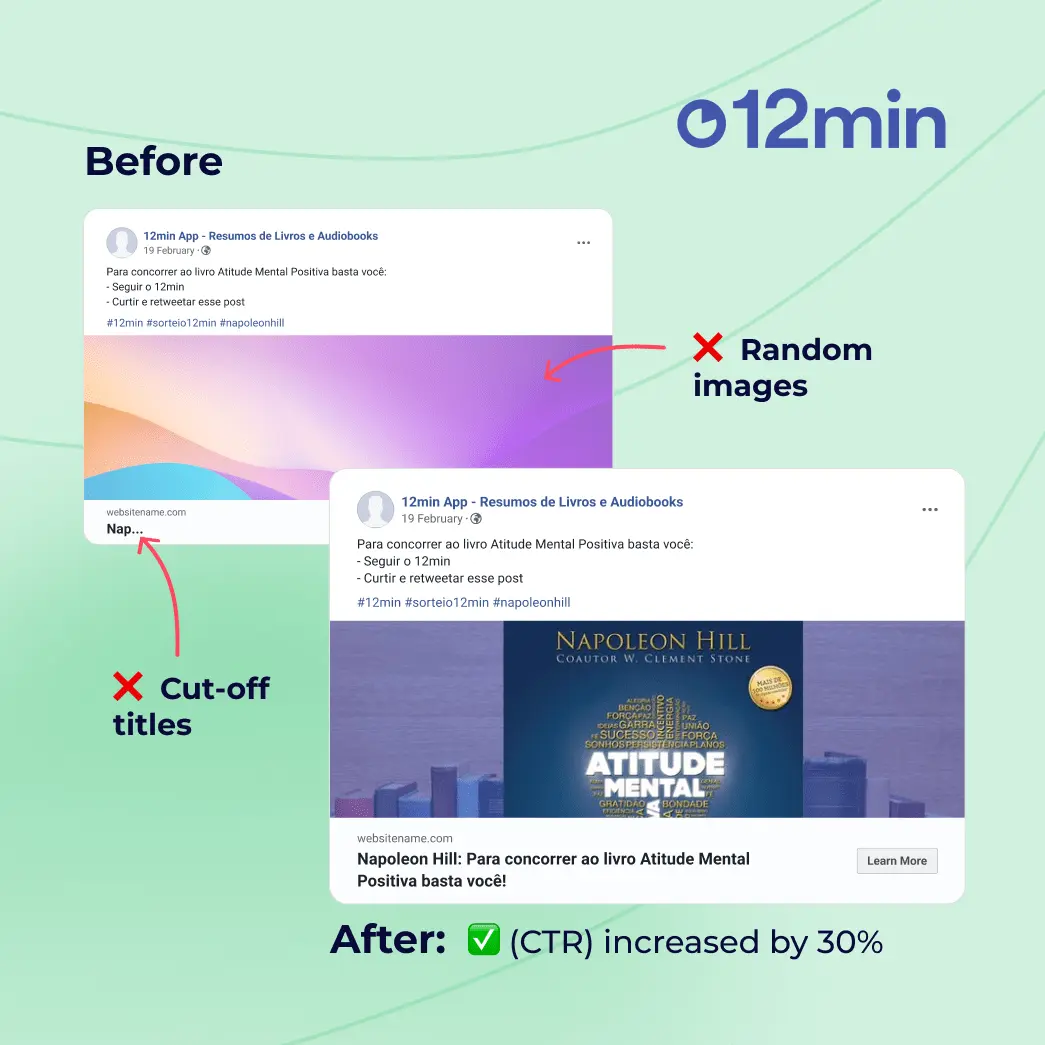
If that preview is broken, blurry, or off-brand, people are much less likely to click. Open Graph meta tags give you control over that first impression so your links look intentional everywhere they're shared.
In this guide, we'll walk through what Open Graph tags are, how they work, and how to implement them correctly — plus a deeper look at each key tag so your team has a practical reference to work from.
Why Open Graph Meta Tags Matter
Open Graph was originally introduced by Facebook, but today these social media meta tags are read by most major platforms and messaging apps. When a crawler hits your URL, it looks for Open Graph meta tags in the <head> of the page and uses them to build the preview.
Done well, Open Graph meta tags help you:
Control how your brand appears in feeds and chats
Improve click through rates by pairing strong titles and descriptions with a real image
Avoid embarrassing previews, like a missing image, a stray placeholder heading, or "Lorem ipsum" text pulled from the page
Keep your content consistent across platforms, no matter how people share your links
A handful of accurate tags does all of this without touching the rest of your page.
What Are Open Graph Meta Tags?
If you just want the shape of a correct implementation before reading further, here it is:
<meta property="og:title" content="Your Page Title">
<meta property="og:type" content="website">
<meta property="og:image" content="https://example.com/image.jpg">
<meta property="og:url" content="https://example.com/page">
<meta property="og:description" content="A short description of the page.">
The official Open Graph protocol defines four required properties for every page: og:title, og:type, og:image, and og:url. og:description is not technically one of those four required properties, but you should still include it on almost every page, since platforms use it to fill in the supporting line under your title and image.
With that baseline in place, here's the fuller picture.
Open Graph meta tags are regular <meta> tags that live in the <head> of your HTML. They use property="og:..." attributes to describe what should appear in your link preview.
At a high level, they cover:
Title – the headline of the content
Description – a short summary or hook
Image – the thumbnail or hero image, often just called the open graph image
URL – the canonical URL of the page
Type – the kind of content (website, article, and a set of extended types)
Site name – your brand or site label
Most platforms will fall back to HTML <title> and generic meta descriptions if you don't specify Open Graph tags, but you'll get much more control — and more consistent results — by setting them explicitly.
The Core Open Graph Tags You Should Always Set
Most platforms only need a handful of Open Graph tags to build a clean, consistent preview. Think of these as your "core four" (plus a few close friends) that you should set on nearly every important page.
og:title
This is the headline that appears in the preview. It's what grabs attention in a crowded feed.
<meta property="og:title" content="Open Graph Meta Tags: Complete Guide + Examples">
Aim for something clear, benefit-driven, and concise. In practice, keeping og:title on the shorter side helps it display cleanly across most platforms.
og:description
The description supports the title and gives people a reason to click.
<meta property="og:description" content="Learn how to control your social link previews with Open Graph tags so your content looks great everywhere it's shared.">
Think of this as a one–two sentence summary that teases value instead of repeating the title. Avoid keyword stuffing or generic "about us" text — this is copy your users will actually see.
og:image
This is the hero image that shows up in the card, often just called the open graph image. It's usually the first thing people notice, so it's worth getting right.
<meta property="og:image" content="https://example.com/images/og-meta-tags-guide.jpg">
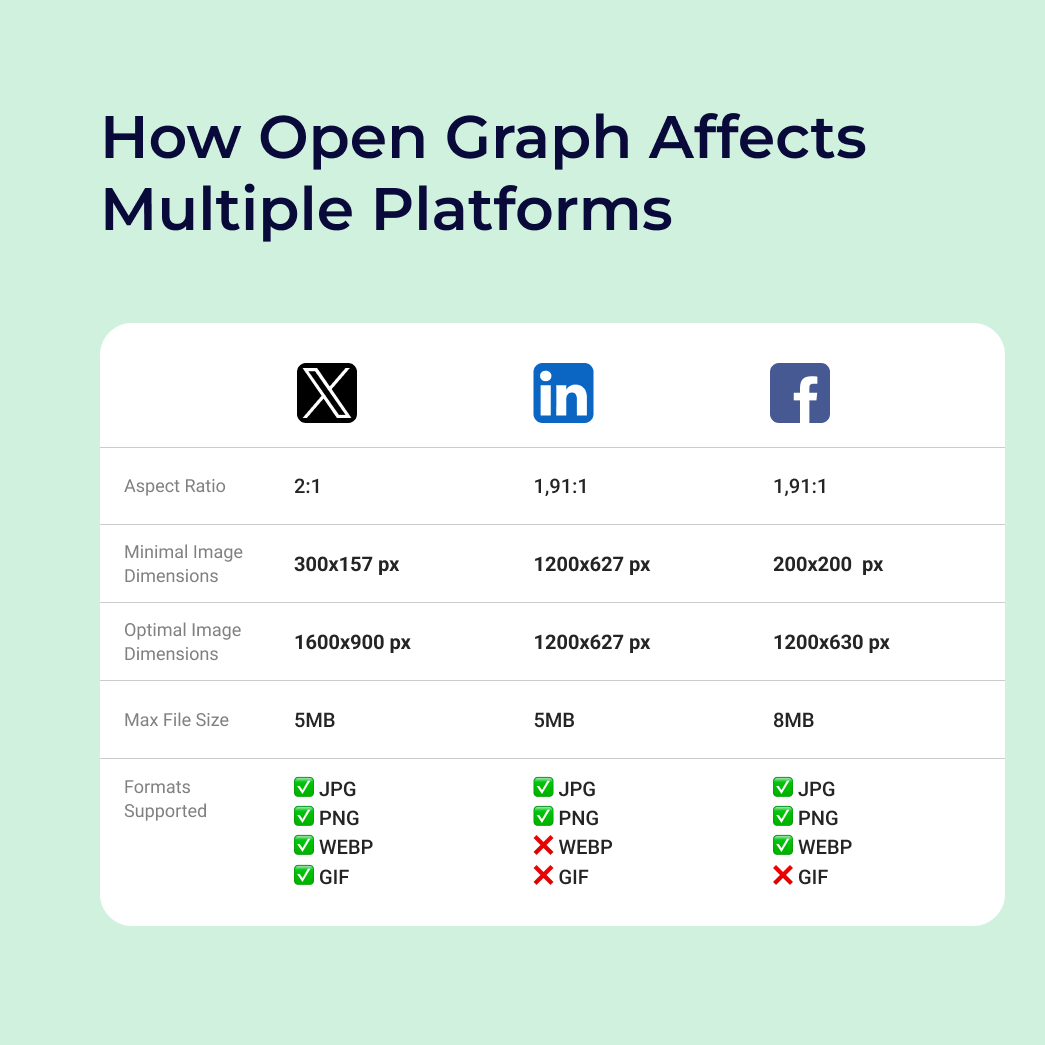
Use a high-quality image that's sized for social previews (commonly around 1200 × 630 pixels with a ~1.91:1 aspect ratio). Avoid tiny images, generic stock photos, or anything with tiny text that will be unreadable at card size.
og:url
og:url tells platforms which URL you consider the "canonical" version of the page. This helps consolidate engagement metrics and prevents duplicate cards for the same content.
<meta property="og:url" content="https://example.com/open-graph-meta-tags">
Always use the final canonical URL here (including HTTPS and trailing slash conventions) rather than a tracking link, URL shortener, or internal redirect.
og:type
og:type helps platforms understand what kind of content they're dealing with, which can unlock additional properties and better display options.
<meta property="og:type" content="article">
The official Open Graph protocol defines a set of global types, including website, article, profile, book, music types such as music.song, and video types such as video.movie.
Values like product are used by specific platforms and commerce extensions built on top of Open Graph, but they aren't part of the current core Open Graph type list, so it's more accurate to treat them as platform-specific rather than official OGP types.
For most blog posts and documentation pages, article is appropriate. For general pages, website is appropriate.
og:site_name
og:site_name gives your brand or site label a dedicated spot in the preview, separate from the title.
<meta property="og:site_name" content="OpenGraph.io">
This is usually just the name of your site or product. Keeping it short and consistent across your domain strengthens brand recognition.
og:locale
If your site targets a specific language and region, you can also specify og:locale:
<meta property="og:locale" content="en_US">
This uses the language_TERRITORY format (for example, en_US, en_GB, fr_FR) and is especially useful for international sites that deliver localized content.
Once these core tags are in place, platforms have everything they need to generate clean, on-brand previews — and you can start layering in more advanced tags where it makes sense.
Extended Open Graph Tags for Articles and Content-Heavy Sites
Beyond the core tags, there are several "nice-to-have" properties that give platforms more context and can improve how your content is categorized and displayed.
Article-specific tags
If you publish blog posts or news content, it's worth using the article:* namespace:
<meta property="article:published_time" content="2024-06-25T10:00:00Z">
<meta property="article:modified_time" content="2026-09-21T10:00:00Z">
<meta property="article:author" content="https://example.com/authors/blake-archer">
<meta property="article:section" content="Content Marketing">
<meta property="article:tag" content="open graph">
<meta property="article:tag" content="social media previews">
article:published_time– Original publish date/time in ISO 8601 formatarticle:modified_time– Last significant update timearticle:author– URL to an author profile or bio pagearticle:section– High-level category (for example, "Documentation", "Product Updates")article:tag– More granular topics or keywords (you can repeat this tag multiple times)
These signals help platforms group and recommend your content more intelligently, especially for news and long-form articles.
og:image:alt
og:image:alt is the text alternative for your Open Graph image. It's great for accessibility and can also provide extra context when images fail to load.
<meta property="og:image:alt" content="Screenshot of an optimized Open Graph link preview showing a clear title, description, and image.">
Treat this like high-quality alt text: short, descriptive, and focused on what's actually in the image and why it matters.
Image dimensions and multiple images
You can optionally include width and height to make it easier for platforms to render your image without additional requests:
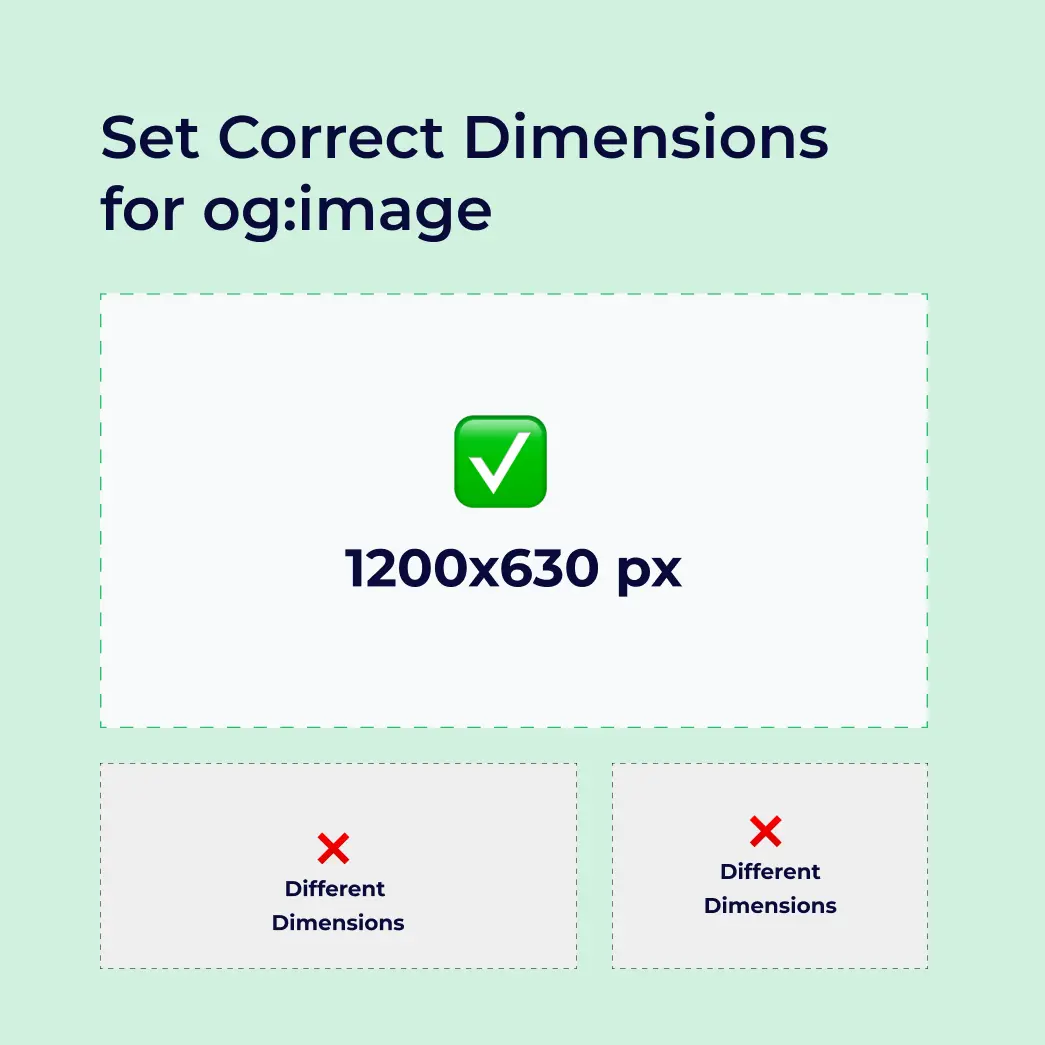
<meta property="og:image:width" content="1200">
<meta property="og:image:height" content="630">
For some content types, you might also want to specify more than one preview image (for example, a gallery or multiple product shots). You can repeat og:image and its related tags:
<meta property="og:image" content="https://example.com/images/guide-cover.jpg">
<meta property="og:image:alt" content="Cover image for the Open Graph meta tags guide.">

<meta property="og:image" content="https://example.com/images/step-by-step-preview.jpg">
<meta property="og:image:alt" content="Step-by-step example of improving a social link preview.">
Different platforms may choose different images or fall back gracefully if one fails — but they all still rely on the same underlying OG metadata.
Open Graph Quick-Reference (for Developers and Marketers)
When you're implementing OG tags at scale, it helps to have a simple checklist you can share with both your engineering team and your content/SEO team.
| Tag | Required? | Purpose | Ideal Length / Format | Primary Owner |
|---|---|---|---|---|
og:title |
Yes | Social headline | Short, clear, and benefit-driven | Marketing + Dev |
og:description |
Recommended | Supporting summary | ~1–2 short sentences | Marketing |
og:image |
Yes | Preview image | High-quality, social-sized image | Dev |
og:url |
Yes | Canonical share URL | Absolute canonical URL (HTTPS) | Dev |
og:type |
Yes | Content type | website, article, profile, book, or a video/music type |
Dev |
og:site_name |
Recommended | Brand or site label | Short, consistent brand name | Marketing |
og:locale |
Optional | Language/region | language_TERRITORY (e.g., en_US) |
Dev |
og:image:alt |
Recommended | Accessible image description | Short, descriptive sentence | Marketing + Dev |
article:published_time |
Optional | Original publish date | ISO 8601 datetime | Dev |
article:modified_time |
Optional | Last updated time | ISO 8601 datetime | Dev |
article:section |
Optional | High-level content category | Short category label | Marketing |
article:tag |
Optional | Topic/keyword tags | One keyword or short phrase per tag | Marketing |
You won't need every one of these tags on every page, but the core set (og:title, og:description, og:image, og:url, and og:type) should be part of your default template. The rest can be added where they create extra value — for example, on content hubs, blogs, and high-traffic campaigns.
How Open Graph Meta Tags Work
When a platform (like Facebook or LinkedIn) sees someone paste your URL into a post, it typically:
Fetches the HTML of your page
Scans the
<head>for Open Graph meta tagsUses those tags to build the link card (title, description, image, URL, etc.)
Caches that result so it doesn't have to re-scrape the page every time
If Open Graph tags are missing, the crawler falls back to whatever else it can find: your <title> tag, generic meta descriptions, random images on the page, and sometimes even body text. That's where you get mismatched previews and inconsistent branding.
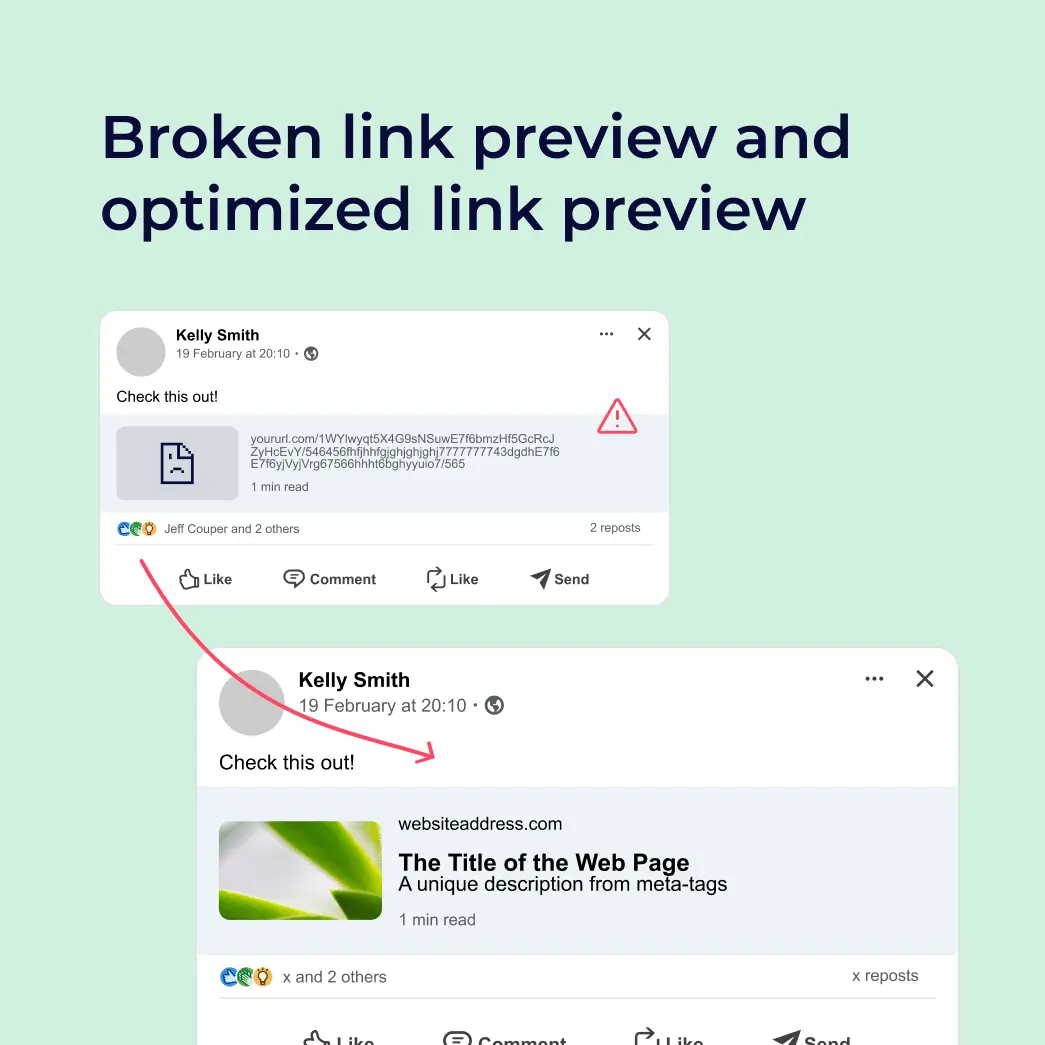
By defining a clean set of OG tags, you're effectively handing platforms a "ready-made" preview so they don't have to guess.
Common Open Graph Mistakes (and How to Fix Them)

Even simple tags can go wrong. Some of the most common mistakes we see:
No Open Graph tags at all, forcing platforms to guess
Incorrect or broken
og:imageURLs (404s, hotlink protection, or blocked CDNs)Images that are too small or the wrong aspect ratio
Using non-canonical URLs in
og:url(for example, UTM-heavy tracking URLs)Duplicated or conflicting tags (multiple
og:titlevalues with different content)Copy-pasting the same title/description across every page instead of tailoring them
To fix these, start by:
Defining a standard OG template for your site (core tags + any article tags you need)
Confirming that all URLs are absolute, HTTPS, and accessible to public crawlers
Ensuring your images meet size/aspect-ratio guidelines and load quickly
Regenerating or purging platform caches using their debug tools when you update content
You can also keep a short, internal checklist for new pages to ensure OG metadata is added before launch.
How to Implement Open Graph Meta Tags
There are a few common ways to add OG tags to your site, depending on your stack.
Manual HTML
For static sites or server-rendered pages, you can simply include OG tags in the <head> of your HTML template:
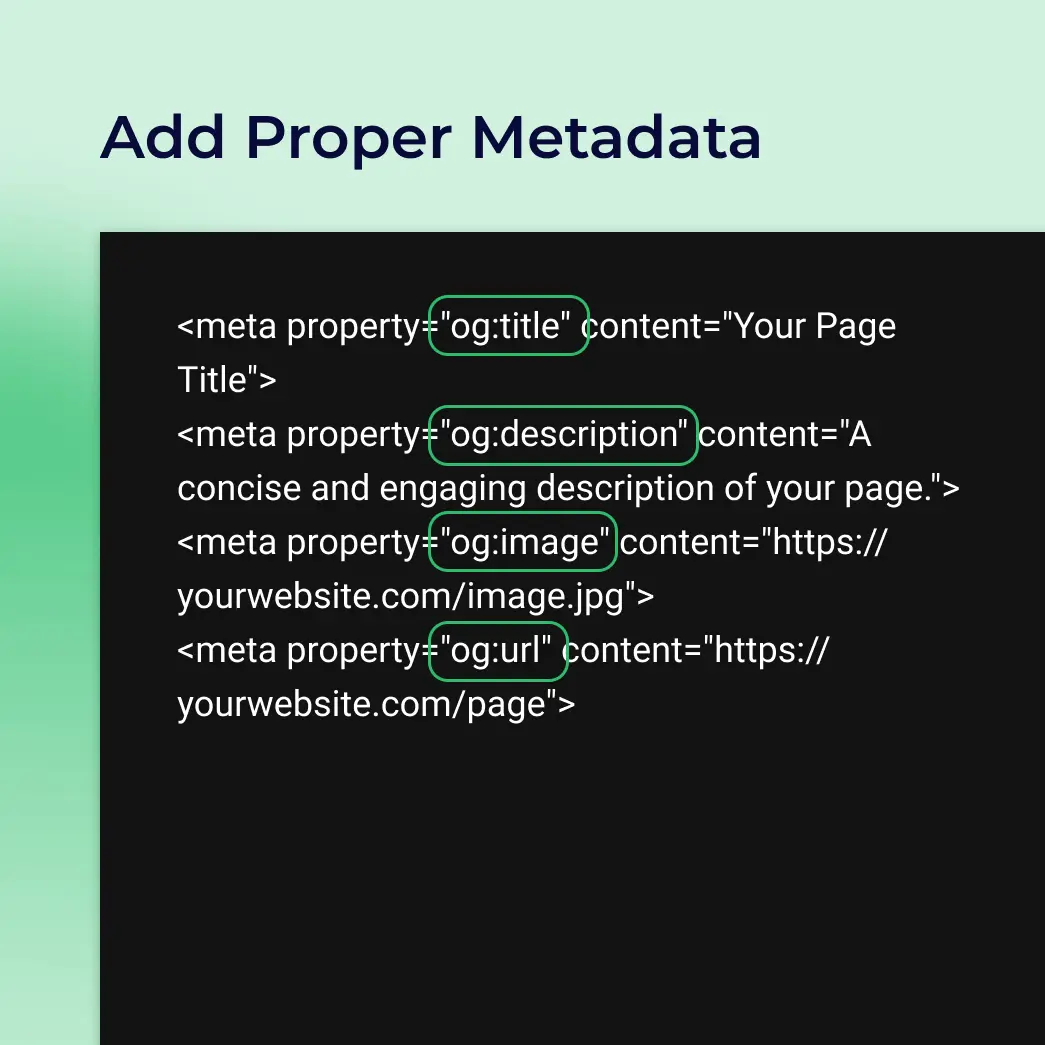
<head>
  <title>Open Graph Meta Tags: Complete Guide + Examples</title>
  <meta name="description" content="Learn how Open Graph meta tags control social link previews. See the essential OG tags, code examples, image sizes, implementation tips, and testing tools.">

  <meta property="og:title" content="Open Graph Meta Tags: Complete Guide + Examples">
  <meta property="og:description" content="Learn how to control your social link previews with Open Graph tags so your content looks great everywhere it's shared.">
  <meta property="og:image" content="https://example.com/images/og-meta-tags-guide.jpg">
  <meta property="og:url" content="https://example.com/open-graph-meta-tags">
  <meta property="og:type" content="article">
  <meta property="og:site_name" content="OpenGraph.io">
</head>
Next.js App Router Metadata API
If you're building with Next.js and the App Router, you can set Open Graph tags through the built in Metadata API instead of writing <meta> tags by hand:
export const metadata = {
  title: "Open Graph Meta Tags: Complete Guide + Examples",
  description: "Learn how Open Graph meta tags control social link previews.",
  openGraph: {
    title: "Open Graph Meta Tags: Complete Guide + Examples",
    description: "Learn how Open Graph meta tags control social link previews.",
    url: "https://example.com/open-graph-meta-tags",
    siteName: "OpenGraph.io",
    images: [
      {
        url: "https://example.com/images/og-meta-tags-guide.jpg",
        width: 1200,
        height: 630,
      },
    ],
    type: "article",
    publishedTime: "2024-06-25T10:00:00Z",
    modifiedTime: "2026-09-21T10:00:00Z",
    authors: ["https://example.com/authors/blake-archer"],
  },
}
When openGraph.type is set to "article", Next.js also supports article-specific fields directly on the same object, including publishedTime, modifiedTime, and authors. Next.js renders all of this into the correct Open Graph and article <meta> tags on the server, so a crawler never sees a page before the tags exist.
Other Frameworks and SPAs
If you're using a different frontend framework (React without Next.js, Vue, and so on), make sure OG tags are rendered on the server or through a pre-rendering step. Many crawlers still have trouble executing client side JavaScript before reading metadata.
Most frameworks provide a helper for setting <head> tags at the page level, so you can generate OG tags dynamically based on route data, CMS content, or API responses.
CMS and Plugins
If you use a CMS such as WordPress, Ghost, or Shopify, you'll often find SEO or social plugins that handle OG tags for you.
The key is to verify:
The plugin is actually outputting OG tags in the final HTML
You have per-page control over
og:title,og:description, andog:imageYou're not generating duplicate or conflicting tags from multiple plugins or themes
Regardless of how you implement them, the same rules apply: define your core tags, make sure they're correct, and test them in the wild.
Open Graph vs X/Twitter Cards
Open Graph and X (formerly Twitter) Cards solve the same basic problem, controlling how a link looks when it's shared, but they use two different tag namespaces.
Open Graph tags use the og: prefix and were built for Facebook and the wider web. X Cards use a separate twitter: prefix, for example twitter:card, twitter:title, and twitter:image.
X can fall back to compatible Open Graph properties when the corresponding twitter: tag isn't present, so a page with solid og:title, og:description, and og:image tags will often still get a reasonable preview on X even without any Twitter specific metadata. That fallback isn't guaranteed for every field in every situation, though.
It's still worth setting one Twitter specific tag explicitly:
<meta name="twitter:card" content="summary_large_image">
twitter:card controls whether X shows a large image card or a smaller summary style card, and it isn't something Open Graph can set on its own.
In practice, most sites generate both sets of tags from the same page metadata in their CMS or framework, then let X read whichever twitter: tags exist and fall back to compatible Open Graph properties for the rest. You don't need a separate content strategy for X, just a twitter:card value plus the same accurate title, description, and image you're already setting for Open Graph.
Testing and Debugging Your Open Graph Tags
Even when everything looks right in your HTML, platform caches and quirks can still cause surprises. That's why testing and debugging matter.
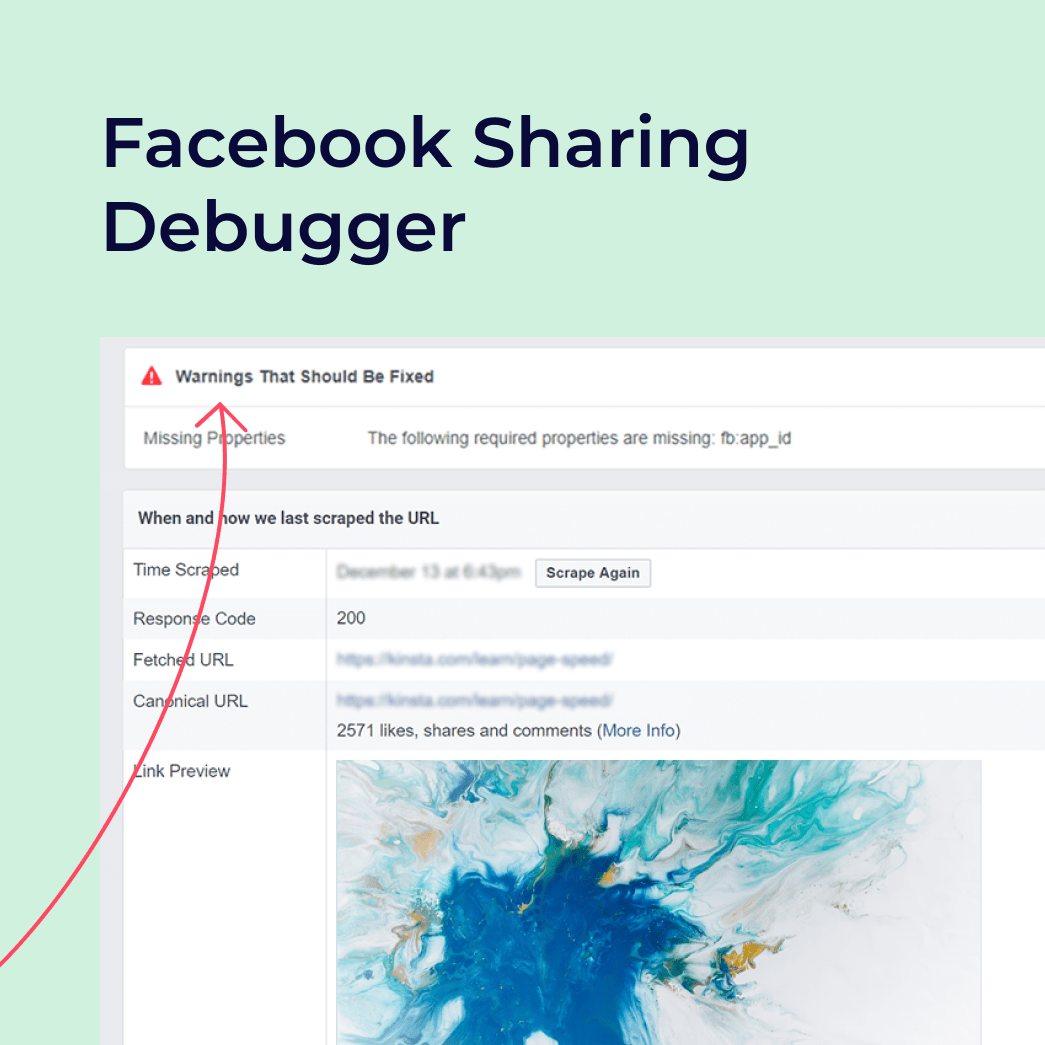
A few tools are still worth keeping in your toolkit:
Facebook Sharing Debugger for Facebook and Messenger previews, and to force a fresh scrape after you update a page
LinkedIn Post Inspector for LinkedIn previews
For X, the public Card Validator that many older guides still reference is no longer available in that form. The most reliable check is pasting the link into the X post composer itself and looking at the preview it builds before you post
Your own logs and monitoring, to confirm crawlers can actually reach your pages and image URLs
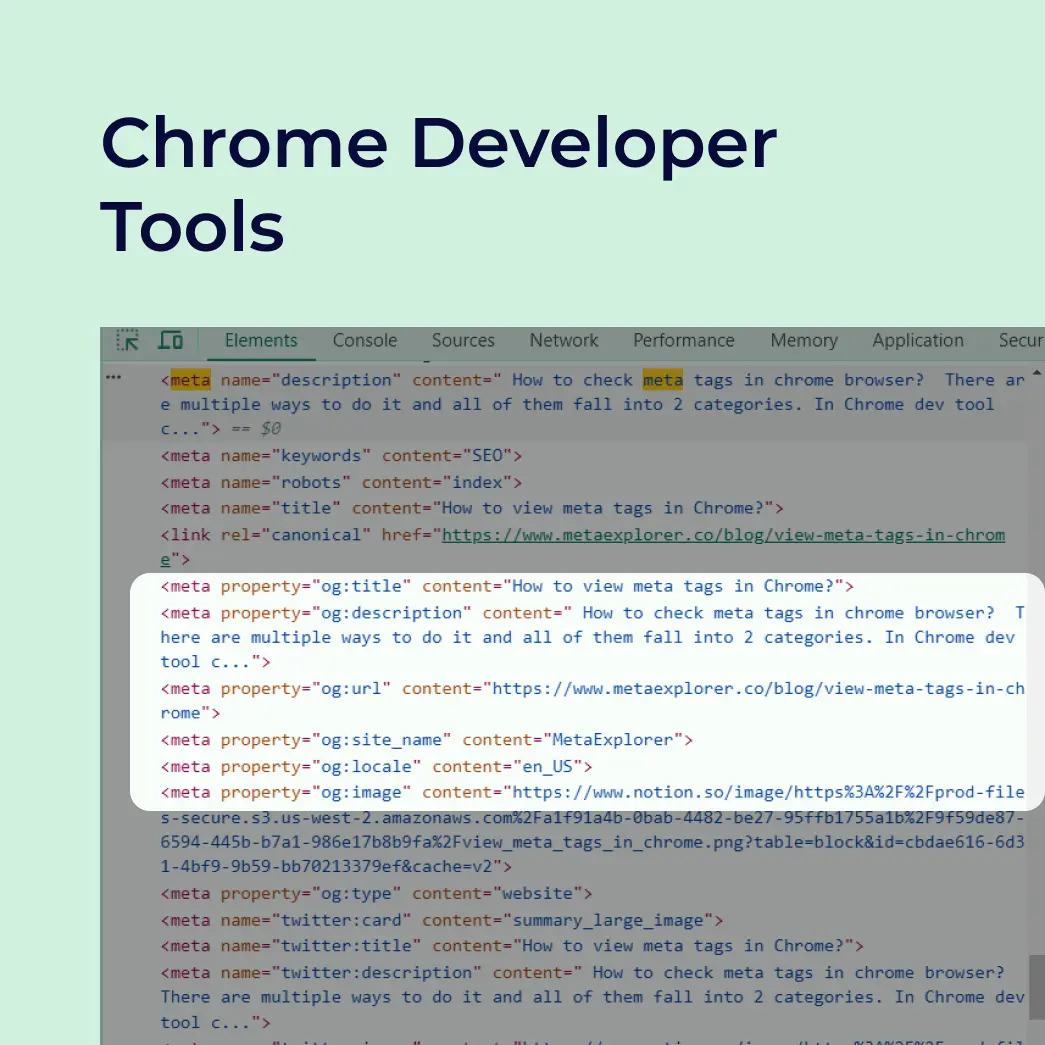
For a fast check across Facebook, LinkedIn, X, and Google without opening several separate tools, use our Open Graph Checker to check a page before you share it, then follow this guide:
If something still looks off, walk through the most common issues step by step in our Open Graph error fixes guide:
Together, these give you a tight loop: adjust tags, clear the cache, confirm the preview, then ship.
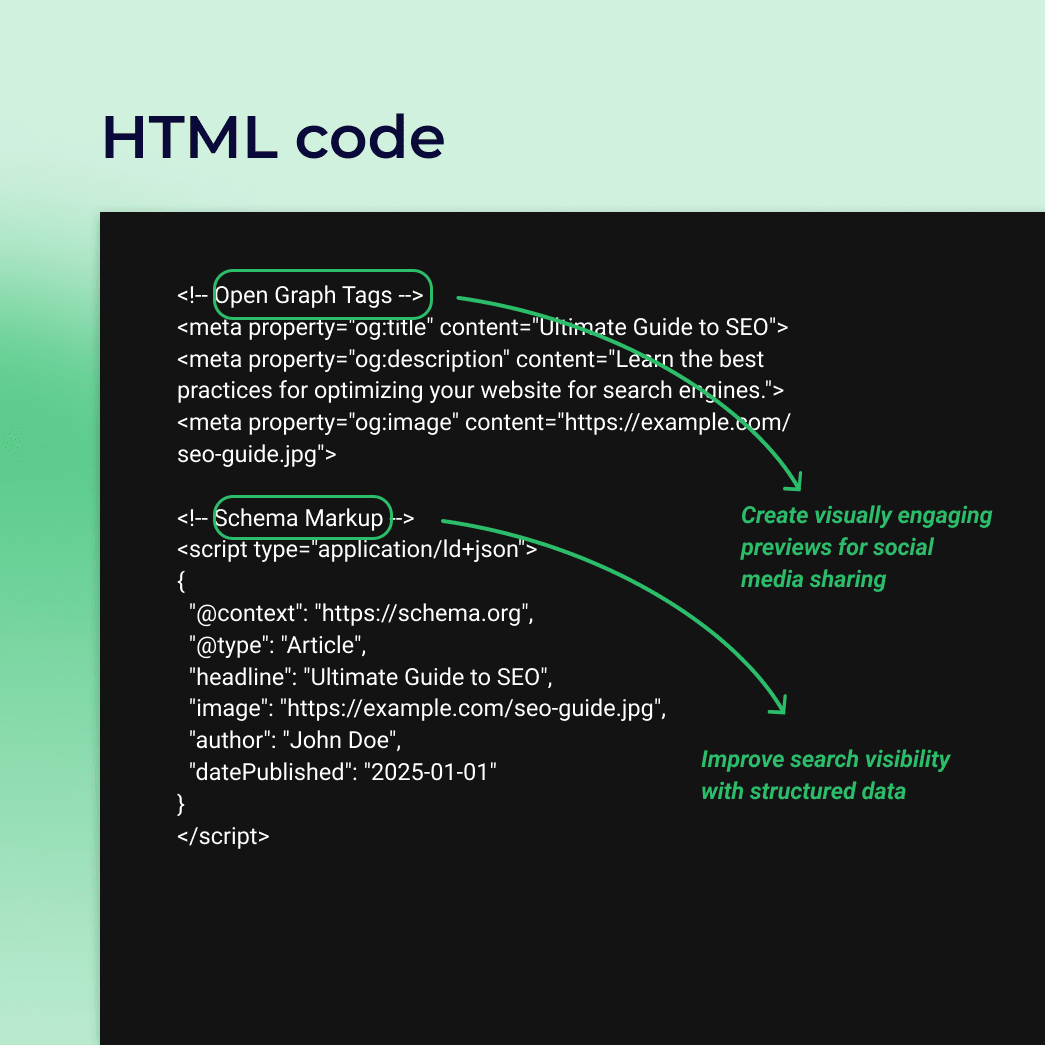
Open Graph vs JSON-LD (and Why They're Not the Same Thing)
Open Graph and JSON-LD often show up in the same conversations, but they solve different problems and are consumed by different systems.
Open Graph tags are primarily for social platforms. They control how your content looks when shared on Facebook, LinkedIn, X (Twitter), and other networks — titles, descriptions, images, and URLs.
JSON-LD / Schema markup is structured data for search engines. It helps Google and others understand your content in more detail (articles, products, events, etc.) and can influence rich results and special search features.
You don't have to choose one or the other. In fact, most modern sites benefit from using both: Open Graph for social previews and JSON-LD for SEO.
Side-by-side example
Here's how an article might look when you implement OG for social and JSON-LD for search on the same page:
<!-- Open Graph meta tags for social previews -->
<meta property="og:title" content="Open Graph Meta Tags: Complete Guide + Examples">
<meta property="og:description" content="Learn how to control your social link previews with Open Graph so your content looks great wherever it's shared.">
<meta property="og:image" content="https://example.com/images/og-meta-tags-guide.jpg">
<meta property="og:url" content="https://example.com/open-graph-meta-tags">
<meta property="og:type" content="article">
<meta property="og:site_name" content="OpenGraph.io">

<!-- JSON-LD structured data for search engines -->
<script type="application/ld+json">
{
  "@context": "https://schema.org",
  "@type": "Article",
  "headline": "Open Graph Meta Tags: Complete Guide + Examples",
  "description": "Learn how to control your social link previews with Open Graph so your content looks great wherever it's shared.",
  "image": "https://example.com/images/og-meta-tags-guide.jpg",
  "author": {
    "@type": "Person",
    "name": "Blake Archer"
  },
  "datePublished": "2024-06-25T10:00:00Z",
  "dateModified": "2026-09-21T10:00:00Z",
  "mainEntityOfPage": {
    "@type": "WebPage",
    "@id": "https://example.com/open-graph-meta-tags"
  }
}
</script>
Both blocks live in the <head> of the same page. Social networks will read the OG tags to build link previews, while search engines will read the JSON-LD to better understand your content.
Best Practices Checklist
To pull this together, here's a quick checklist you can use when optimizing a page:
Core tags (
og:title,og:description,og:image,og:url,og:type) are present and accurateog:site_nameandog:localeare set consistently across your domaintwitter:cardis set tosummary_large_imagewhen you want a large-image preview on XImages are high-quality, properly sized, and accessible to crawlers
Canonical URLs are used in
og:url(no shorteners or tracking variants)Article-specific tags are added on posts and long-form content where useful
There are no duplicate or conflicting OG tags in the final HTML
The page has been tested in platform debuggers and in the Link Preview tool
Any issues surfaced by debug tools are resolved using the Debug Open Graph Tags and Open Graph Error Fixes guides
You can also keep a small internal content brief or template that includes Open Graph fields so writers and marketers provide strong titles and descriptions up front instead of treating them as an afterthought.
A Quick Before-and-After Example
Imagine a blog post with no OG tags at all. When someone shares it:
The title gets truncated or pulled from a generic
<title>The description is an auto-generated snippet from the first paragraph
The image is a random in-article graphic that doesn't represent the content
Now add Open Graph tags:
A clear, benefit-driven
og:titlethat speaks directly to the readerA tight
og:descriptionthat teases the outcome or main takeawayA dedicated
og:imagethat's designed to look good in card formatA canonical
og:urlthat keeps all engagement signals in one place
Suddenly, that same share looks like a deliberate, well-designed card instead of a lucky accident — and you didn't have to change the body of the article at all.
Wrapping Up
Open Graph meta tags are one of those small details that quietly carry a lot of weight. A few accurate <meta> tags can noticeably improve how your content looks, and performs, whenever someone shares it.
Start by standardizing the core tags, then layer in article-specific and extended tags, plus twitter:card, where they make sense. Use tools like platform debuggers and the OpenGraph.io Link Preview tool to preview and validate your changes, and keep the Debug Open Graph Tags and Open Graph Error Fixes guides handy whenever something doesn't behave as expected.
Once this becomes part of your normal publishing workflow, you'll spend less time firefighting bad previews and more time shipping content that looks great everywhere it appears.