What Is a Link Preview? Everything You Need to Know

Introduction
Ever noticed how some shared links look more appealing than others?
That's because link previews display a title, description, image, and URL to give users a quick glimpse of the content.
Well-optimized previews boost trust, engagement, and click-through rates (CTR). Different platforms generate previews using Open Graph tags (Facebook, LinkedIn) and Twitter Cards (Twitter, X).
When misconfigured, links may appear broken, missing images, or showing incorrect titles.
This guide covers how link previews work, why they matter, and how to optimize them for better engagement.
What Is a Link Preview?
A link preview is the automatically generated snippet that appears when you share a URL on social media, messaging apps, or emails. It helps users understand what they're about to click on, increasing engagement.
What's Included in a Link Preview?
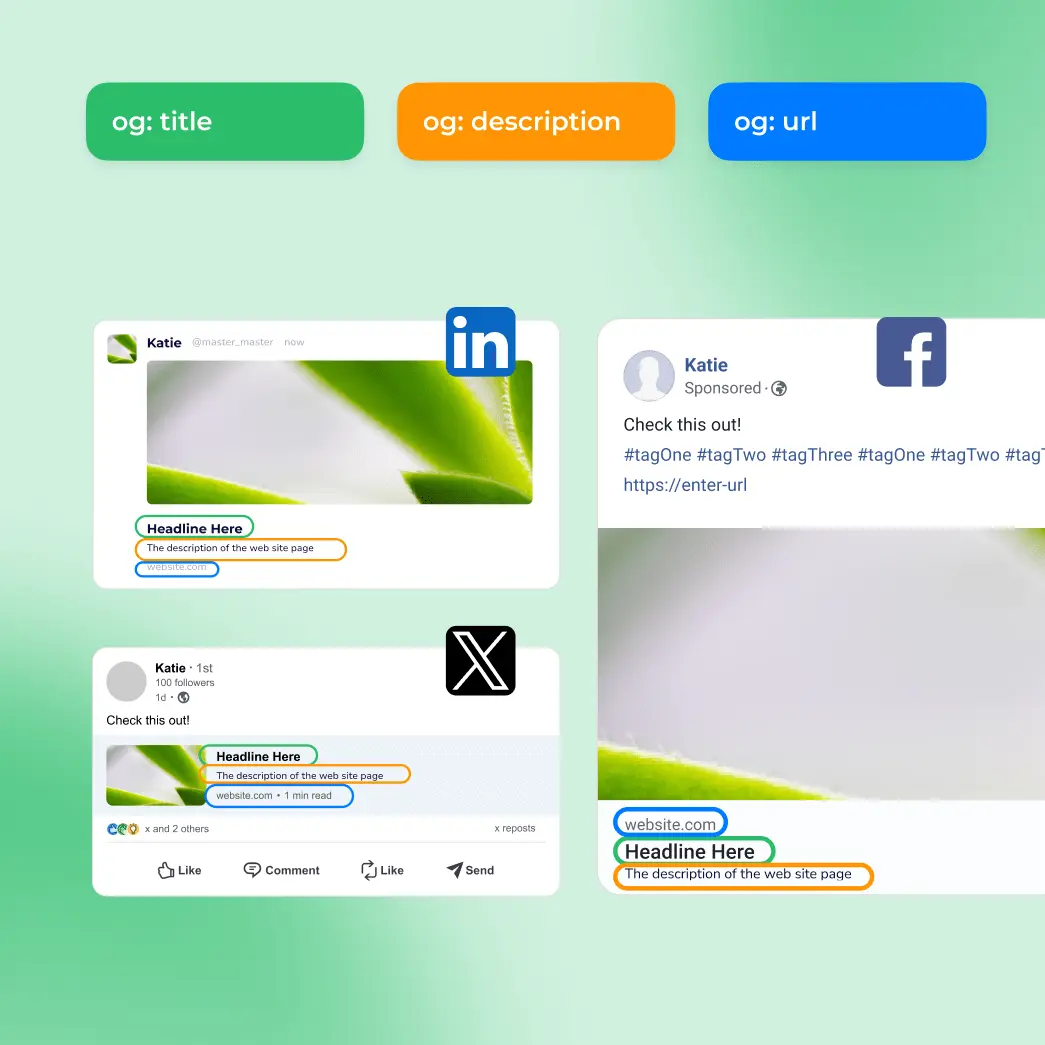
- Title – The headline of the linked page.
- Description – A short summary that gives users context.
- Image – A thumbnail that makes the preview visually appealing.
- URL – The destination link users will visit.
Example Link Previews on Different Platforms:
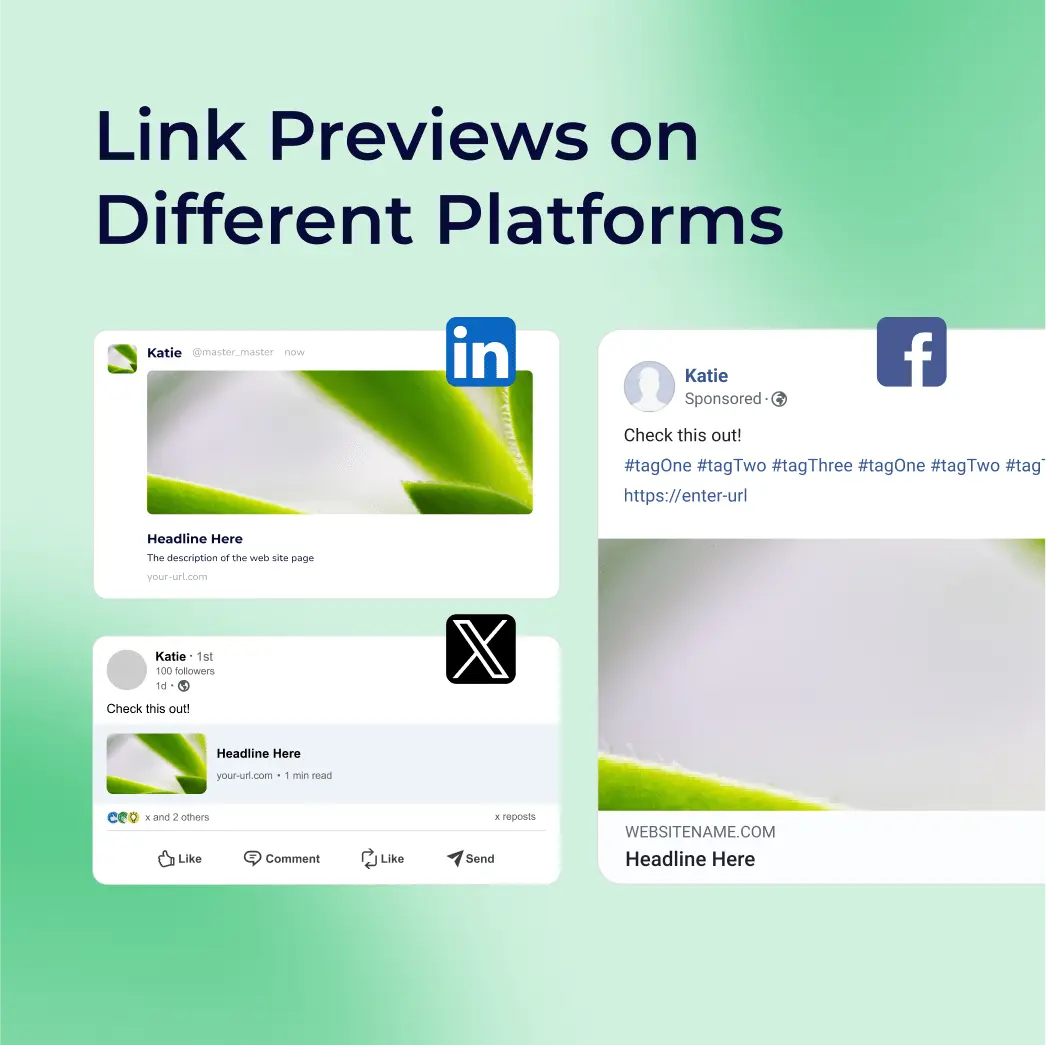
- Facebook & LinkedIn → Use Open Graph (OG) metadata.
- Twitter/X → Uses Twitter Cards instead.
- WhatsApp & Telegram → Extract preview data from OG tags.
- Google Search Snippets → Uses structured data (Schema.org).
Example of an optimized link preview on Facebook:
<meta property="og:title" content="How to Boost Your Productivity in 2024">
<meta property="og:description" content="Discover proven techniques to maximize efficiency and get more done.">
<meta property="og:image" content="https://example.com/productivity.jpg">
<meta property="og:url" content="https://example.com/productivity-guide">
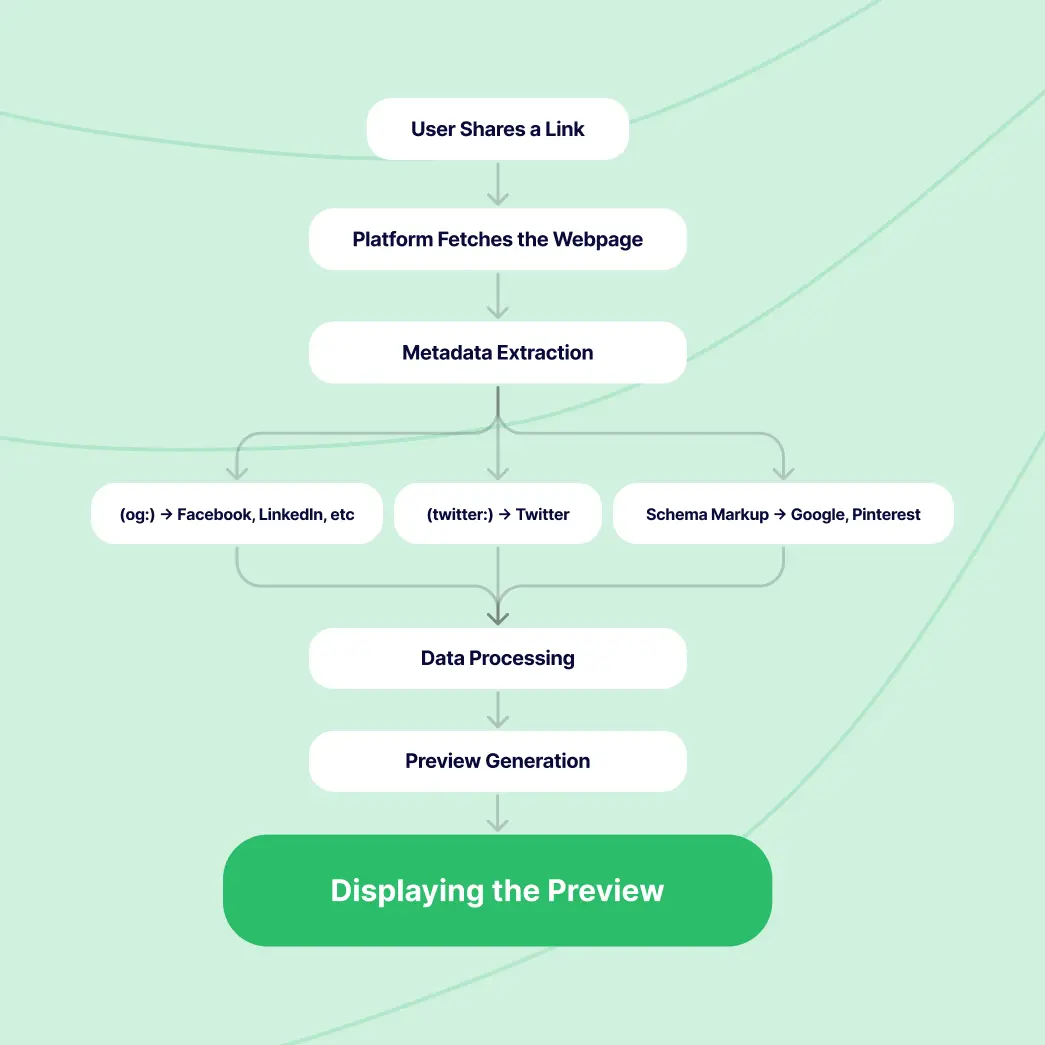
How Link Previews Work
The Role of Metadata
When a social media platform or messaging app detects a URL, it extracts metadata from the page to generate the preview. This data is usually pulled from:
- Open Graph (OG) tags → Facebook, LinkedIn, WhatsApp
- Twitter Cards → Twitter/X
- Schema Markup (Structured Data) → Google Search, Pinterest
How Different Platforms Handle Link Previews
Each platform processes link previews differently based on the metadata available.
While Facebook and LinkedIn rely on Open Graph tags, Twitter uses Twitter Cards, and Google extracts structured data from Schema.org to display rich search snippets.
Understanding these differences ensures your content appears correctly across all platforms and prevents broken or missing previews.
| Platform | Metadata Type | Key Preview Elements |
|---|---|---|
| Open Graph (OG) | Title, Description, Image, URL | |
| Open Graph (OG) | Title, Description, Image | |
| Twitter/X | Twitter Cards | Title, Description, Image, Twitter Handle |
| Open Graph (OG) | Title, Description, Image | |
| Schema Markup | Rich Snippet, Structured Data |
Why Link Previews Matter for SEO & Social Media
A well-optimized link preview is more than just a visual enhancement—it directly impacts how users perceive and interact with your content.
Whether on social media, messaging apps, or search engines, a compelling preview can significantly boost engagement, increase trust, and drive more traffic to your website.
Here's why link previews matter:
- Boosts Click-Through Rates (CTR): A well-designed preview is eye-catching, encouraging users to click more often.
- Increases Trust & Credibility: A broken preview (missing title/image) can look untrustworthy, reducing engagement.
- Enhances Social Media Engagement: Posts with rich previews outperform plain links in terms of likes, shares, and comments.
- Improves SEO & Branding: Helps keep consistent branding across social platforms.
Common Issues with Link Previews (and How to Fix Them)
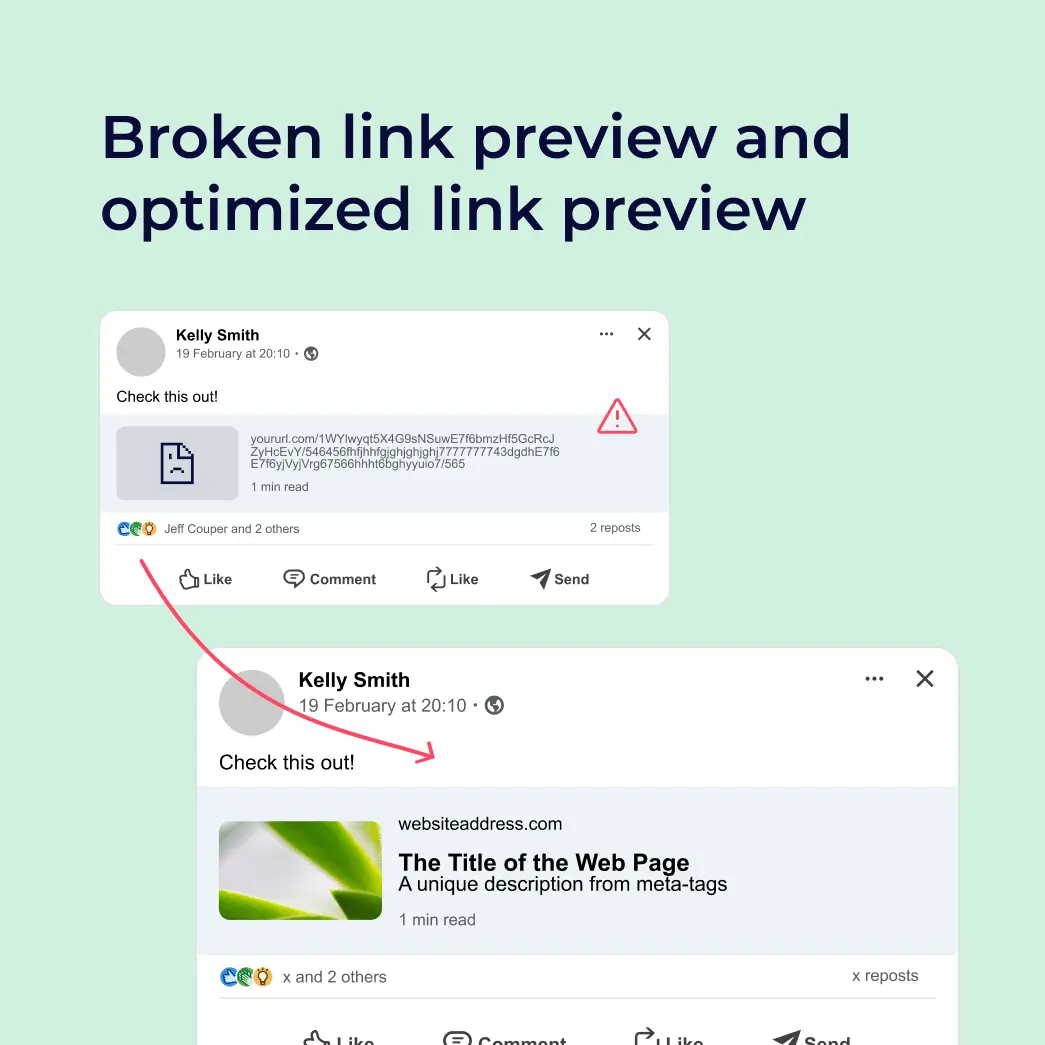
1. Broken or Missing Previews
Problem: A link doesn't generate a preview at all.
Fix:
- Ensure Open Graph or Twitter Card metadata is present in
<head>. - Test using the Open Graph link preview tool or Twitter Card Validator.
2. Incorrect Images or Titles
Problem: Wrong image or title appears when sharing a link.
Fix:
- Update OG metadata with correct values.
- Force a cache refresh using Facebook Debugger or LinkedIn Post Inspector.
3. Platform-Specific Problems
Problem: Previews look great on Facebook but broken on Twitter.
Fix: Use both Open Graph and Twitter Cards in your HTML.
<meta property="og:image" content="https://example.com/image.jpg">
<meta name="twitter:image" content="https://example.com/image.jpg">
Pro Tip: Always test your previews before publishing on social media.
How to Optimize Link Previews for Maximum Impact
A well-optimized link preview ensures your content stands out in crowded social media feeds and messaging apps.
By fine-tuning your titles, descriptions, images, and metadata, you can significantly increase click-through rates (CTR) and engagement.
Follow these best practices to make your link previews as compelling as possible:
Best Practices for Titles
- Keep them short (40-60 characters).
- Make them engaging but not clickbait.
Crafting Effective Descriptions
- Use 80-110 characters for the best readability.
- Clearly state why users should click.
Choosing the Right Images
- Recommended size: 1200x630 px (Facebook & LinkedIn), 1200x675 px (Twitter).
- PNG format for transparency, JPG for faster loading.
Tools to Test and Debug Link Previews
1. OpenGraph.io
Use for: Testing Open Graph metadata for multiple platforms.
2. Facebook Sharing Debugger
Use for: Checking and forcing Facebook to update previews.
3. Twitter Card Validator
Use for: Ensuring Twitter displays the correct metadata.
4. Meta Tags Preview Tool
Use for: Testing metadata before publishing.
Real-World Example: How Optimized Link Previews Increased Engagement
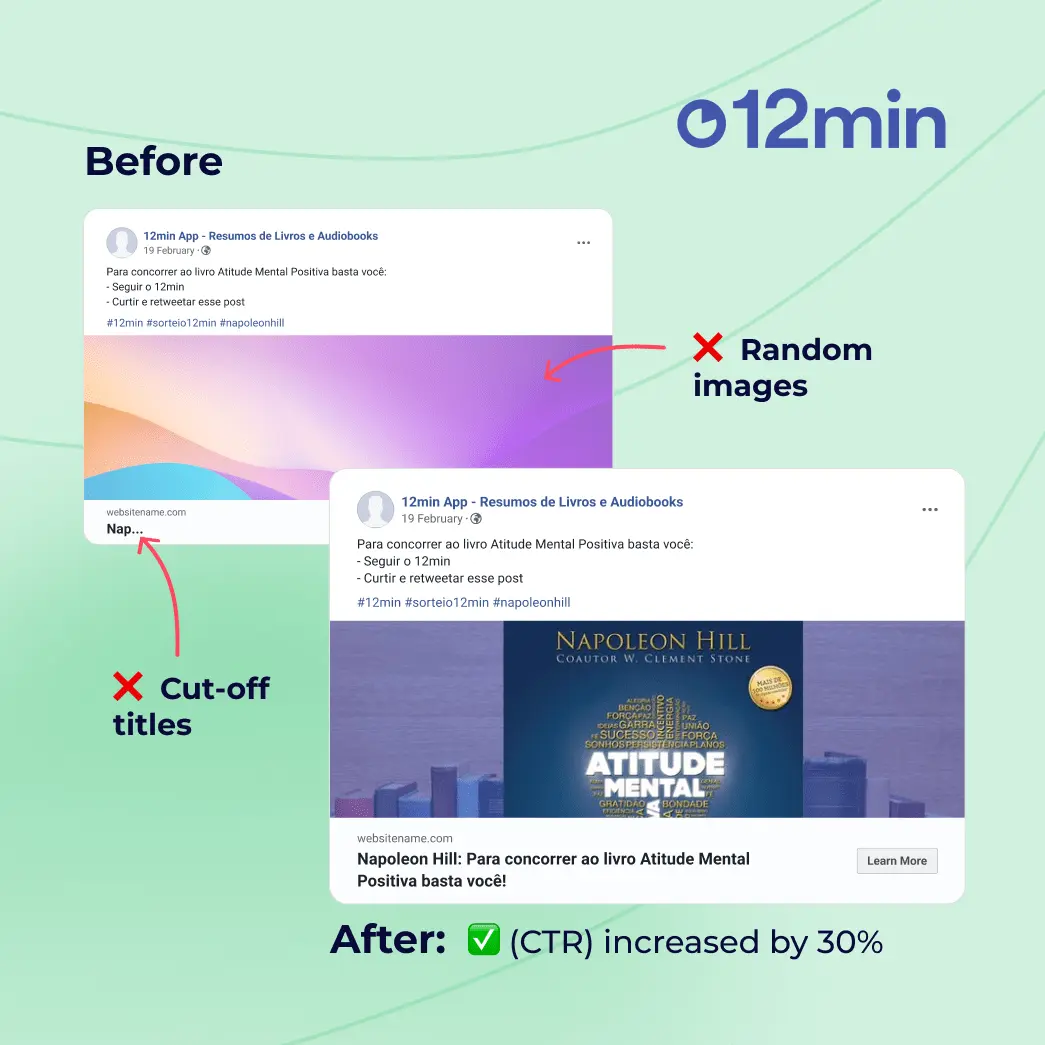
Case Study: 12min App Increased CTR by 30%
Problem: The 12min app, known for providing concise book summaries, faced an issue where their shared links on social media displayed random images and cut-off titles, negatively affecting engagement.
Solution: They implemented correct Open Graph tags, including high-quality images and optimized titles. They also forced cache refreshes on Facebook to ensure the updated previews appeared correctly.
Result: Click-through rates (CTR) increased by 30%, and organic shares improved by 40%, leading to greater visibility and engagement across social platforms.
Conclusion
A well-optimized link preview can significantly improve CTR, trust, and engagement. Broken previews hurt clicks, so it's essential to test and optimize your metadata for each platform.
Next Steps:
- Check your link previews using OpenGraph.io.
- Fix broken previews with Facebook Debugger.
- Use both OG tags and Twitter Cards for cross-platform consistency.
- Need previews generated automatically in your own app? See the Link Preview API.
By following these best practices, your links will always look professional and drive better engagement!
Want to see it live? Test your social preview here.