

How to Scrape Websites Without Getting Blocked (2025 Guide)

Executive summary
You will get blocked sometimes. That's normal. The real skill is building a scraper that notices early, adapts quickly, and keeps success rates high without torching IPs or annoying site owners. This guide walks you from first request to a production-ready setup: how sites spot bots, the fundamentals that keep you under the radar, when to render JavaScript, what to log, and how to scale. Code is in Node.js (18+), with Playwright examples where a browser is required.
How websites detect scraping
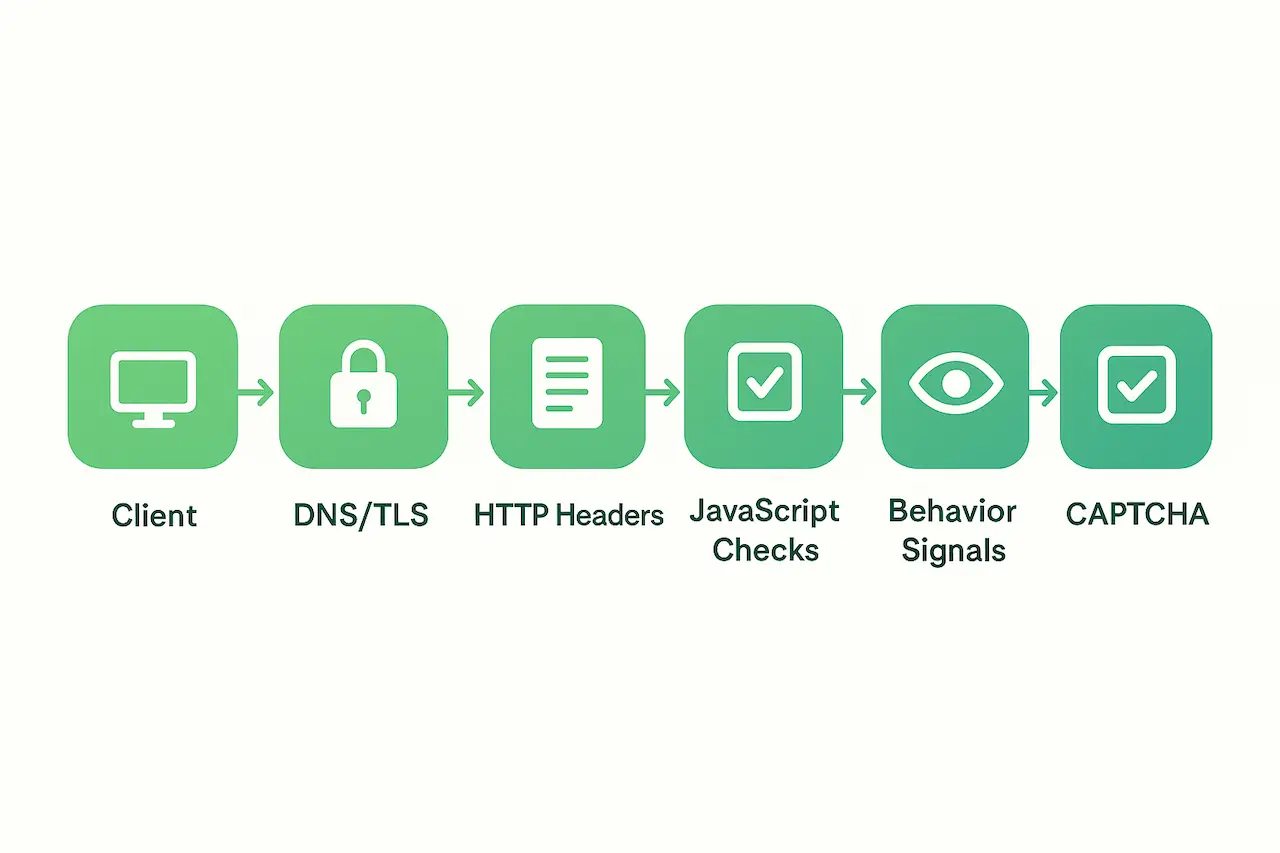
Fingerprinting
- Headers. Servers compare the shape of your request—
User-Agent,Accept,Accept-Language,Referer, encodings. Real browsers send coherent combinations. Bots often claim one browser but send headers that don't match. Pick a UA and make the rest of the headers match it. - TLS fingerprinting. Even before HTTP, your TLS handshake exposes a signature. Odd or rare client fingerprints can stand out. You don't need perfection—just avoid obviously unusual clients.
- JavaScript probes. Pages sample Canvas, Audio, WebGL, plugins, fonts, and timing APIs to build a browser profile. Headless flags, missing APIs, or impossible GPU lists add friction. Reduce anomalies and reuse good sessions.
Rate limiting
Sites watch request volume per IP or session and look for patterns: exact cadences, bursts against one path, or hammering the same account. Add jitter, spread requests over time, and vary your path mix.
Behavioral signals
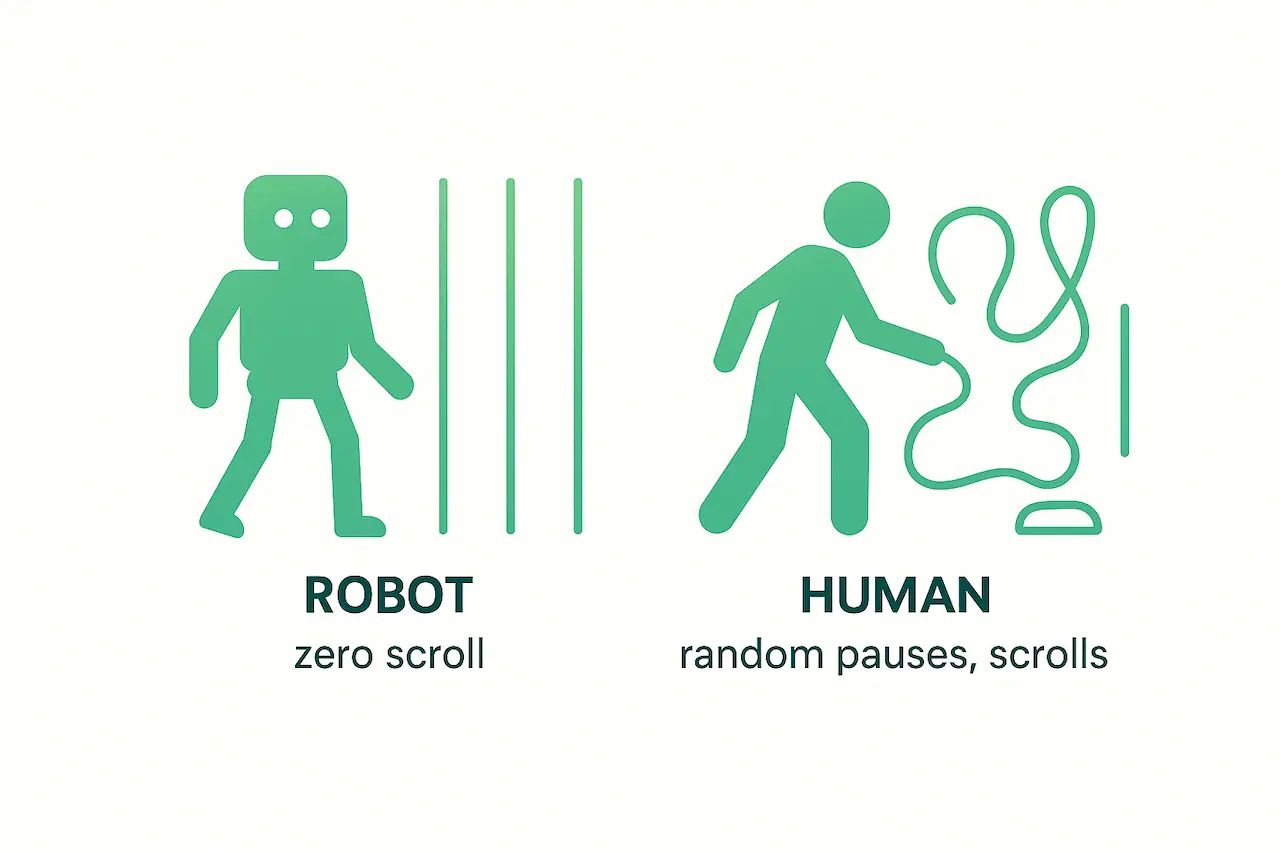
Humans scroll, pause, move a mouse in messy arcs, and sometimes abandon flows. Bots often load → extract → exit. If you must simulate behavior, keep it subtle: short dwell, light scroll, a couple of small mouse moves—enough to look alive without wasting time.
Anti-bot services
Larger sites layer passive checks (headers, TLS, JS) with active challenges (interstitial pages, script computations, token cookies). Your code should detect these and branch—switch IP/fingerprint, slow down, or escalate to a higher-trust lane.
Honeypots
Hidden links or form inputs exist specifically to catch bots. Only interact with visible, actionable elements; verify visibility and on-screen position before clicking or submitting.
CAPTCHAs
Risk-based systems challenge when behavior looks automated. Prevention beats solving: clean fingerprints, moderate speed, older sessions, and consistent geo/locale reduce challenges dramatically.
Core anti-blocking strategies
IP rotation
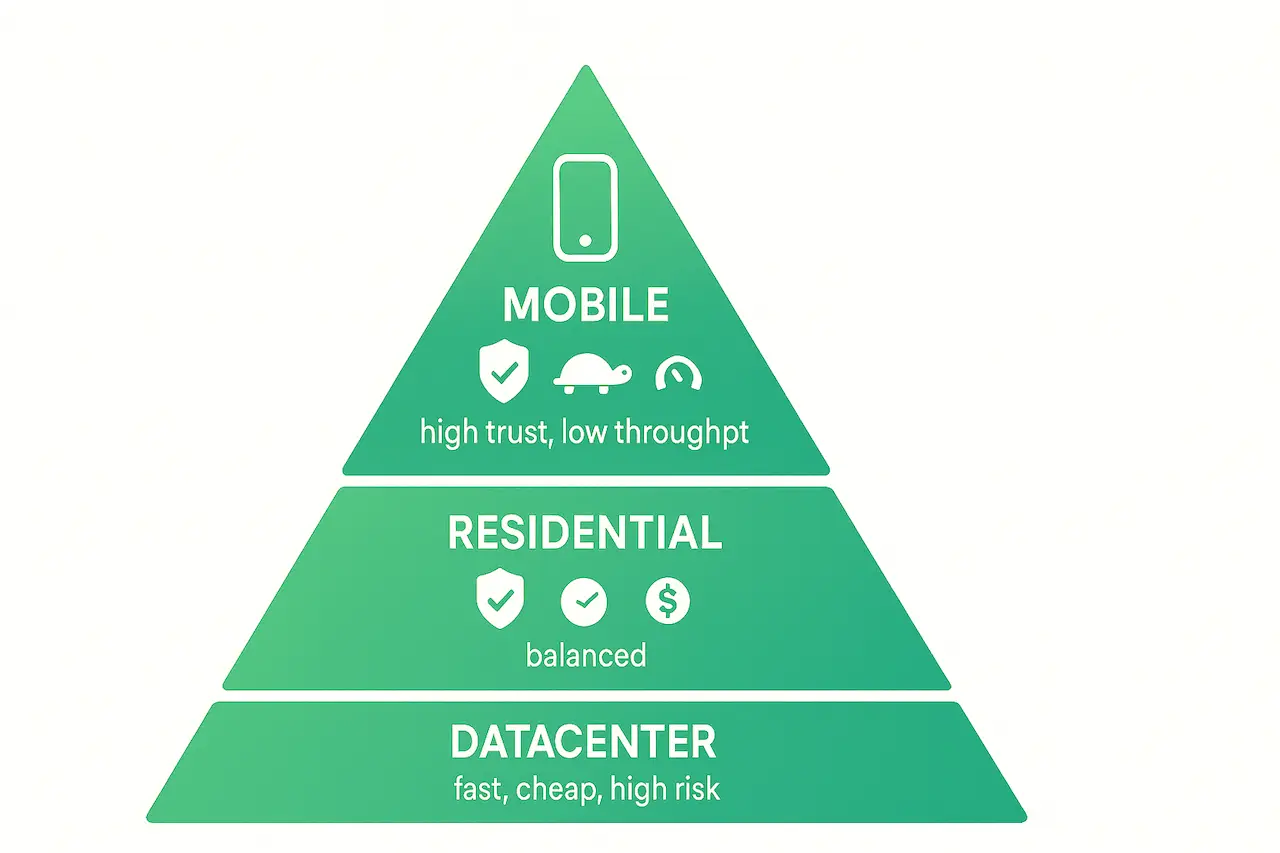
Choose the right network:
- Datacenter: fastest and cheapest; also the easiest to block.
- Residential: closest to consumer traffic; higher trust and cost.
- Mobile: highest trust, lowest throughput; save for the hardest targets.
Rotate per request on hostile sites. Rotate per session or every N pages where cookies matter. Track reputation (success %, block rate, latency) and retire bad IPs.
Header and User-Agent profiles
Pick a modern UA and keep headers consistent with it. Align Accept-Language with the IP's region where possible. Keep a small set of high-quality, coherent profiles instead of randomizing everything every time.
Timing and request patterns
Avoid fixed intervals. Use bounded randomness (e.g., 400–1400 ms on simple pages, 2–8 s dwell on heavier ones). Spread load across time windows and IPs. If you log in, space those login events out.
JavaScript rendering (only when needed)
If the site is static or exposes JSON, use a plain HTTP client—it's cheaper and faster. Switch to Playwright/Puppeteer when the site builds content in the browser, requires script-driven navigation, or depends on cookies generated by JS.
Advanced techniques
CAPTCHA strategy
- Avoid: slow down, improve fingerprints, reuse sessions.
- Defer: detect a challenge and requeue for a stronger lane (residential/mobile, Playwright, older session).
- Solve: last resort. Build a pluggable interface so you can swap in manual or automated solvers if policy allows.
Cookie and session management
Persist cookies to disk and reuse them with the same header profile and, ideally, a similar geo. Treat logins as long-lived sessions with refresh logic. Don't create a brand-new session every run unless you want more friction.
Device and geo emulation
If the site behaves differently on mobile, emulate a mobile UA and viewport. Align Accept-Language, timezone, and exit IP geography. Consistency across UA, headers, and IP matters more than any single toggle.
Avoiding honeypots
Check that elements are visible and within the viewport before you interact. Only submit the fields a real user would touch.
Scalable scraper architecture
Basic infrastructure
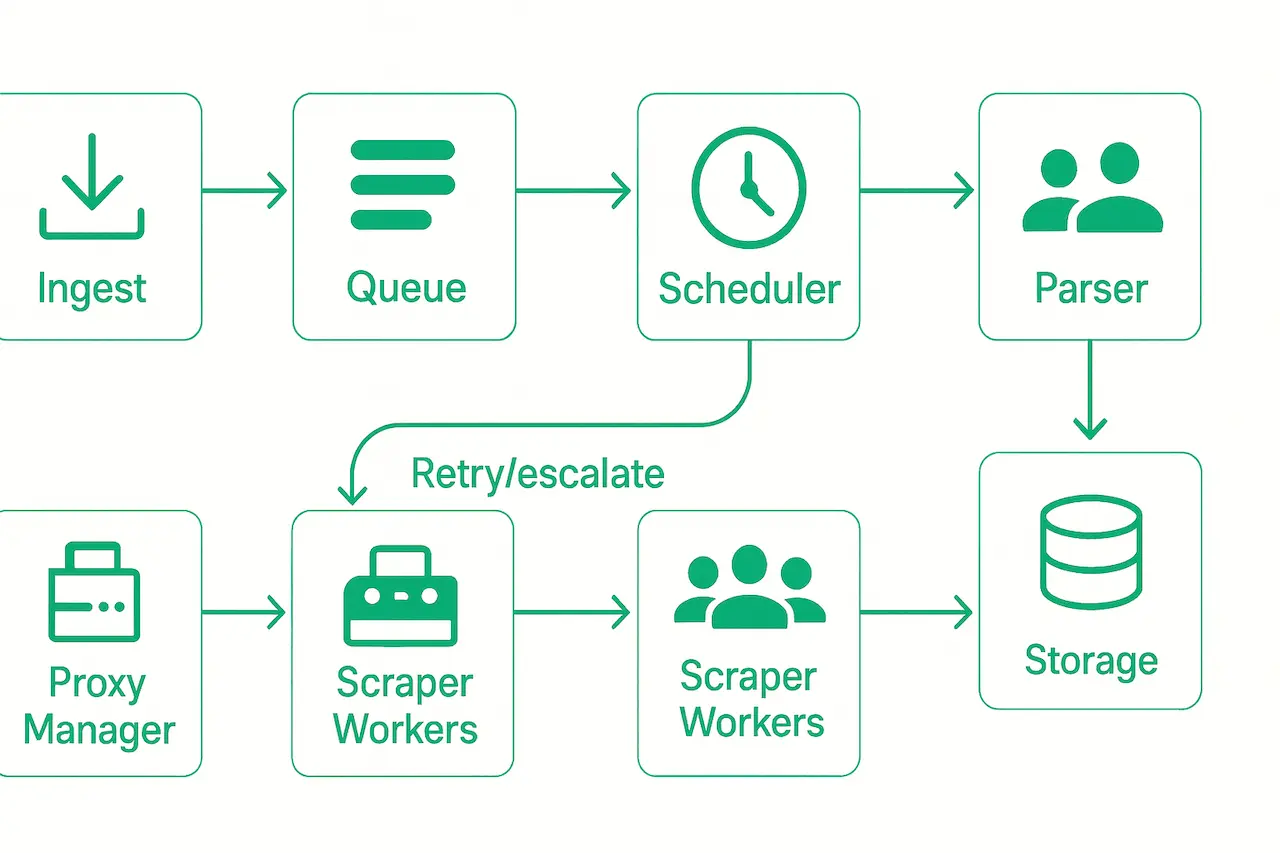
- Workers: JS-heavy targets use Playwright/Puppeteer containers; static/JSON targets use lightweight HTTP workers.
- Queue: Redis/RabbitMQ to feed URLs, retries, and priorities.
- Proxy layer: assigns network types, tracks outcomes, rotates on signals.
- Storage: object storage for HTML/screenshots; relational or document DB for parsed data.
This separation lets you scale each part independently and makes it obvious where time and failures are happening.
Failure recovery
- Retry transient errors (timeouts, 503) with backoff.
- Treat 403/429/CAPTCHA as rotate-or-escalate signals.
- Log URL, status, IP/ASN, header profile ID, fingerprint hash to debug faster and score reputation.
Scheduling and load balancing
Don't let one subnet hammer a domain. Health-check proxies regularly and auto-retire poor performers. Track per-domain error rates and automatically slow or pause when defenses tighten.
Monitoring and metrics
Proxy health. Success rate, latency, and block rate by ASN/region. Sudden 403/429 spikes usually mean rotate and cool down.
Ban detection. Signals: 403/429/503, infinite redirects, challenge interstitials, or missing expected DOM. Detect once, escalate; don't loop.
Crawl efficiency. Track time per URL, retries per URL, and items extracted per page. If rendering dominates a site that also serves JSON, switch that target to an HTTP worker.
Common mistakes
| Mistake | Consequence | Fix |
|---|---|---|
| Using the exact same headers forever | Easy fingerprint → bans | Maintain a handful of coherent header profiles and rotate them. |
| Hammering from one IP | Rate limits and subnet blocks | Rotate IPs by session/request; add jitter; spread load. |
Ignoring robots.txt completely |
Policy conflict and higher risk | Read it and factor it in. Even if not a gate, it tells you what the site expects. |
| Blindly retrying 403/429 | Burns IP reputation | On these statuses, switch IP/fingerprint and slow down. |
| Dropping cookies each run | Looks like a brand-new, suspicious client | Persist and reuse cookies; refresh sessions predictably. |
| Logging in too fast, too often | Behavioral flags and challenges | Reuse sessions, pace logins, keep geo/locale consistent. |
Legal and Ethical Considerations
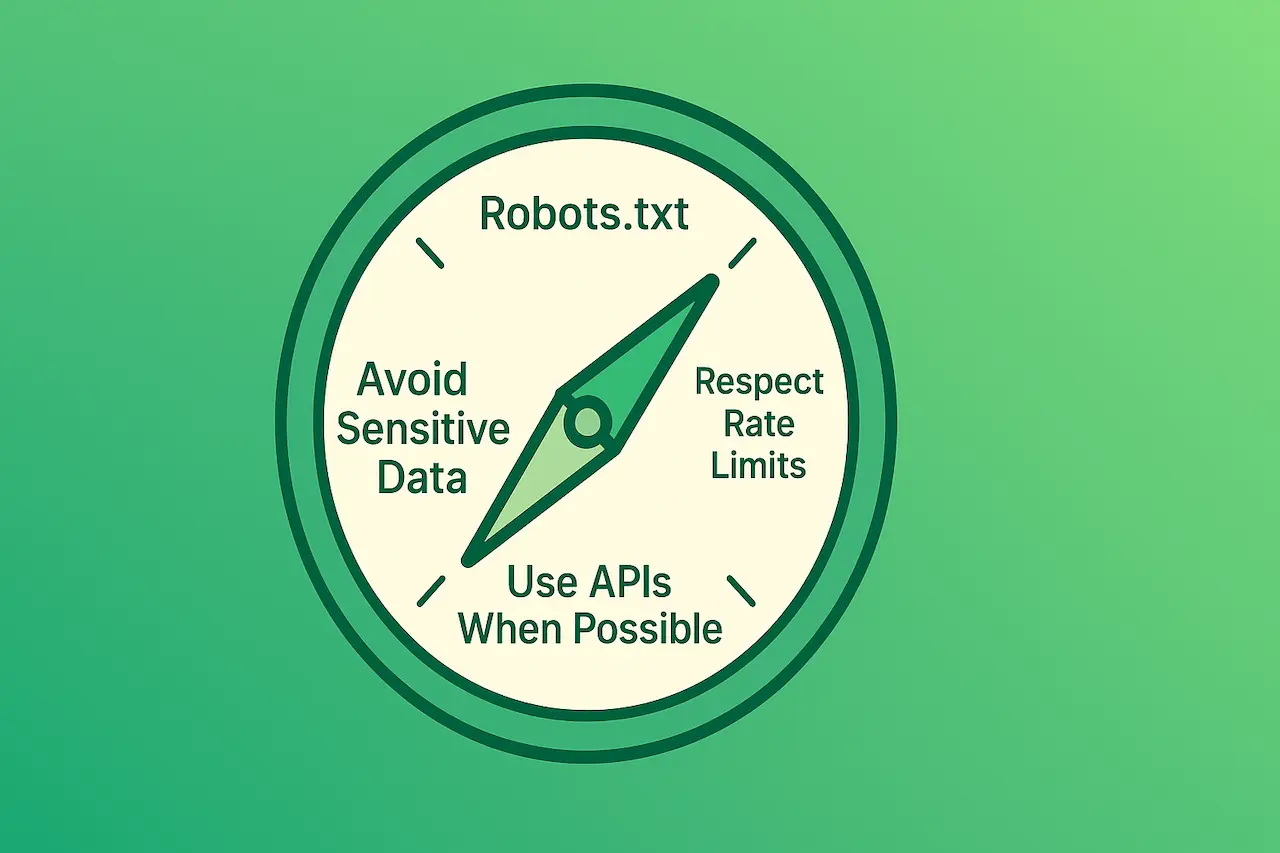
Scraping publicly available data is generally legal in many jurisdictions, but laws and ethics vary by region and context. Follow these guidelines to ensure your scraping remains both compliant and respectful:
Respect Site Policies: Always review and honor the site's
robots.txtfile, Terms of Service (ToS), and usage policies. While not legally binding everywhere, they clearly communicate the site's expectations.Avoid Excessive Traffic: Throttle your requests and implement caching strategies. Excessive scraping can degrade performance for regular users, potentially triggering legal or ethical concerns.
Limit Sensitive Data Collection: Avoid collecting personally identifiable information (PII), protected health information (PHI), financial details, or other sensitive data unless strictly necessary and legally permissible.
Identify Yourself Transparently: If practical, use a clear User-Agent or provide contact information in request headers. This demonstrates openness and allows website administrators to contact you if needed.
Bottom Line: Scraping publicly accessible data is usually acceptable, but always act responsibly, respect site owners, and maintain transparent, ethical practices.
Tools and frameworks
- Playwright (Node). Modern browser automation, per-context proxies, device emulation, strong network hooks. Great default for JS-heavy sites.
- Puppeteer (Node). Mature Chromium automation with a large ecosystem.
- Plain HTTP (Node 18+
fetch). Fast path for static HTML or JSON; pair with jitter, retries, and header profiles.
Real-world-style results (illustrative)
- E-commerce listings: rotating residential IPs + Playwright + session reuse → low-90% success at moderate pace.
- Real-estate portals: JS rendering + cookie reuse + per-session IP stickiness → high-90s with steady timing.
- Job boards with JSON feeds: HTTP client + retry/backoff → ~99% success, almost no challenges.
Code snippets
Static fetch with jitter, retry, and backoff (Node 18+)
import { setTimeout as wait } from 'node:timers/promises';

async function fetchWithRetry(url, { retries = 3, minMs = 400, maxMs = 1400, headers = {} } = {}) {
  const ua =
    'Mozilla/5.0 (Windows NT 10.0; Win64; x64) AppleWebKit/537.36 (KHTML, like Gecko) Chrome/124.0.0.0 Safari/537.36';

  const baseHeaders = {
    'User-Agent': ua,
    'Accept': 'text/html,application/xhtml+xml,application/xml;q=0.9,image/avif,image/webp,*/*;q=0.8',
    'Accept-Language': 'en-US,en;q=0.9',
    'Connection': 'keep-alive',
    ...headers,
  };

  for (let attempt = 1; attempt <= retries; attempt++) {
    const jitter = Math.floor(minMs + Math.random() * (maxMs - minMs));
    if (attempt > 1) await wait(jitter);

    const res = await fetch(url, { headers: baseHeaders, redirect: 'follow' });
    const isBlock = [403, 429, 503].includes(res.status);

    if (!res.ok || isBlock) {
      if (attempt === retries) throw new Error(`HTTP ${res.status}`);
      minMs *= 1.6; maxMs *= 1.6; // backoff
      continue;
    }
    return await res.text();
  }
}
Playwright with per-context proxy, device emulation, and a cookie jar
import { chromium, devices } from 'playwright';
import fs from 'node:fs/promises';

const iPhone = devices['iPhone 13'];

export async function scrapeWithPlaywright(url: string, proxyUrl?: string) {
  const browser = await chromium.launch({
    headless: true,
    proxy: proxyUrl ? { server: proxyUrl } : undefined,
  });

  const context = await browser.newContext({
    ...iPhone,
    locale: 'en-US',
    timezoneId: 'America/Chicago',
    userAgent: iPhone.userAgent,
  });

  try {
    const saved = JSON.parse(await fs.readFile('./cookies.json', 'utf-8'));
    await context.addCookies(saved);
  } catch {}

  const page = await context.newPage();
  await page.setExtraHTTPHeaders({
    'Accept': 'text/html,application/xhtml+xml,application/xml;q=0.9,image/avif,image/webp,*/*;q=0.8',
    'Accept-Language': 'en-US,en;q=0.9',
    'Upgrade-Insecure-Requests': '1',
  });

  await page.goto(url, { waitUntil: 'domcontentloaded', timeout: 45_000 });
  await page.waitForTimeout(1200 + Math.random() * 1400);

  const html = await page.content();

  const cookies = await context.cookies();
  await fs.writeFile('./cookies.json', JSON.stringify(cookies, null, 2));

  await browser.close();
  return html;
}
Detecting a challenge and escalating lanes
function looksLikeChallenge(status: number, html: string) {
  if ([403, 429, 503].includes(status)) return true;
  const lc = html.toLowerCase();
  return lc.includes('captcha') || lc.includes('verify you are human') || lc.includes('attention required');
}

// Example worker flow
const res = await fetch(url, { headers });
const body = await res.text();

if (looksLikeChallenge(res.status, body)) {
  await enqueue({ url, lane: 'high_trust', attempts: (attempts ?? 0) + 1 });
} else {
  await persist(body);
}
Wrap-up
Scraping that lasts isn't about brute force. It's about blending in, pacing your traffic, reusing good sessions, and reacting to signals the moment they appear. Rotate smartly, keep your headers coherent, render only when you must, and watch your metrics. And be a good neighbor: respect site expectations, don't overload servers, and avoid collecting data you don't need. That mindset will carry you much farther than any one trick.
If you want to test scraping a page without setting any of this up, try our free Web Scraping Tool.