

How to Use URL Unfurling for Better Link Previews & Clicks

How to Use URL Unfurling for Better Link Previews and More Clicks
With an abundance of content on social media and messaging platforms, ensuring that your links are presented attractively can significantly impact engagement.
This is where URL unfurling comes into play. By optimizing how links appear, businesses can improve their click-through rates (CTR) and enhance user experience.
In this article, we'll explore what URL unfurling is, how it works, and strategies for using it to boost engagement.
What Is URL Unfurling?
URL unfurling is the process of creating rich previews for URLs shared on social media, messaging apps, or other communication channels. Instead of showing a basic link, unfurling enhances the URL with additional elements like:
- Title: A headline that gives an immediate sense of the content.
- Description: A brief summary that provides more context.
- Image: A thumbnail that visually represents the link.
These elements can make links more engaging, informative, and clickable, drawing more attention and interaction.
How Does URL Unfurling Work?
URL unfurling leverages metadata embedded in web pages, typically using the Open Graph (OG) protocol or similar standards like Twitter Cards. Here's a breakdown of the process:
- Metadata Extraction: When a URL is shared on a platform that supports unfurling (e.g., Facebook, LinkedIn, or Slack), the platform's server fetches metadata from the URL's HTML, specifically looking for tags like:
<meta property="og:title" content="Title of the link" />
<meta property="og:description" content="Description of the link" />
<meta property="og:image" content="https://www.example.com/image.jpg" />
- Rendering: The platform uses the extracted metadata to build a rich preview.
- Display: The link preview is displayed inline, showing the title, description, and image.
Proper implementation of Open Graph tags is key to ensuring that your links unfurl correctly, leading to better link presentation and engagement.
Why Is URL Unfurling Important for Click-Through Rates?
URL unfurling can greatly influence user behavior. Here's why it matters for improving click-through rates:
- Visual Appeal: Humans are naturally drawn to images. A link with a well-designed preview image and headline is more likely to stand out in a social media feed compared to a simple, unformatted URL.
- Trust and Transparency: A rich link preview provides users with a sense of what they can expect after clicking, which builds trust and increases the likelihood of clicks. Users are less likely to click on a link if they don't know what it leads to.
- Better User Experience: Platforms like Slack or WhatsApp display unfurled URLs as part of the conversation, making it easier for users to get the gist of the content without leaving the app. This seamless experience can encourage more engagement with the link.
Best Practices for Optimizing URL Unfurling
To get the most out of URL unfurling, businesses should focus on optimizing their Open Graph tags and following these best practices:
- Craft Compelling Titles: Your Open Graph title (
og:title) should be concise yet descriptive. It should capture the essence of the content and entice users to click. Aim for around 60 characters to ensure it displays well across platforms.
Example:
<meta property="og:title" content="Top 10 Tips for Growing Your Instagram Following" />
- Write Engaging Descriptions: The description (
og:description) should provide a clear summary of the content and create curiosity. Highlight the value or key takeaway the user will get from clicking through. For best results, keep descriptions between 150-300 characters.
Example:
<meta property="og:description" content="Discover actionable strategies to grow your Instagram following organically." />
- Use High-Quality Images: The image (
og:image) is the most visually prominent part of a link preview. Use high-resolution images (at least 1200x630 pixels) to ensure they look good on all platforms. Images should be relevant to the content and evoke interest.
Example:
<meta property="og:image" content="https://www.example.com/images/instagram-growth.jpg" />
Common Mistakes to Avoid
While URL unfurling is straightforward, some common mistakes can hinder its effectiveness:
- Missing Open Graph Tags: Without the correct tags, links will appear as plain URLs, resulting in missed opportunities for engagement.
Example:
<meta property="og:title" content="" />
<meta property="og:description" content="Description of the link" />
<meta property="og:image" content="https://www.example.com/image.jpg" />
- Incorrect Tag Implementation: Incorrectly formatted or missing tag attributes can lead to broken or incomplete link previews.
Example:
<meta property="og:tile" content="" />
<meta property="og:ription" content="Description of the link" />
<meta property="og:image" content="https://www.example.com/image.jpg" />
- Outdated or Irrelevant Images: Using outdated or irrelevant images can misrepresent the content and confuse users.
By avoiding these common mistakes, you can ensure that your content is displayed attractively when shared across social media, leading to more clicks and better engagement.
Examples of Effective URL Unfurling
Case Study 1: eCommerce Store
An online apparel store optimized its product pages with clear, keyword-rich Open Graph titles and high-quality images of their products.
As a result, their Facebook Ads showed a 25% increase in CTR, as the previews provided potential customers with a better sense of the product before clicking through.
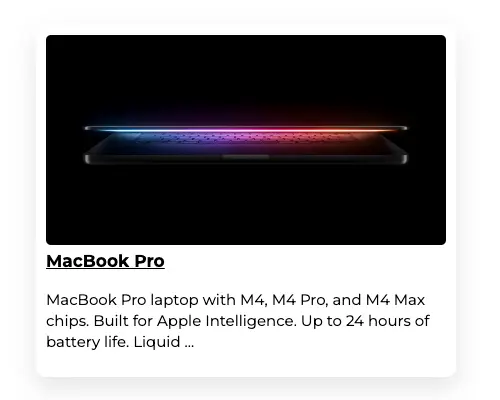
Below is a great example from the Apple website. Compare the clean look provided by the OpenGraph.io React NPM Package, to the plain url: https://www.apple.com/macbook-pro/...
Case Study 2: News Website
A news website ensured that each article featured a compelling image and headline.
When their articles were shared on Twitter and Facebook, the rich previews helped drive more clicks from users who were drawn to the well-crafted headlines and summaries.
How to Measure the Impact of URL Unfurling
To understand the impact of optimized URL unfurling, it's essential to track key metrics:
- Click-Through Rate (CTR): Measure the number of clicks relative to the number of impressions your link receives. A higher CTR suggests that your link previews are appealing to users.
- Engagement Rates on Social Media: Look for metrics like shares, likes, and comments, which indicate how users are interacting with your unfurled links.
- Traffic Analysis: Use tools like Google Analytics to track referral traffic from social media and messaging platforms. This helps identify which channels are generating the most clicks.
Conclusion
URL unfurling is a powerful yet frequently overlooked digital marketing tool. By crafting link previews with compelling titles, engaging descriptions, and high-quality images, businesses can elevate their online presence and increase click-through rates. Whether for a small business or a large enterprise, investing in URL unfurling strategies can make content more appealing, build audience trust, and ultimately drive more traffic to your website.