Supercharge Your Development Workflow with OpenGraph.io's New MCP Tool in Cursor

Introduction
In the ever-evolving landscape of AI-assisted development, the integration between powerful APIs and AI assistants represents one of the most promising frontiers for developer productivity. Today, we're excited to explore OpenGraph.io's latest innovation: the Model-Context-Protocol (MCP) integration that brings powerful web scraping capabilities directly into Cursor's AI environment.
This new tooling bridges the gap between AI assistants like Claude and the rich web data accessible through OpenGraph.io's API, all without exposing sensitive API keys or managing complex authentication flows. Let's dive into how this integration works and why it's a game-changer for developers working with web data.
What is Model-Context-Protocol (MCP)?
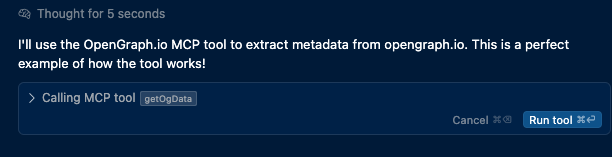
Model-Context-Protocol is an emerging standard that allows AI models to seamlessly interact with external tools and services. Think of it as a secure bridge between AI assistants and the wider digital world. Instead of the AI being limited to just the information in its context window, MCP allows models like Claude to access external data sources and perform actions outside their built-in capabilities.
OpenGraph.io's implementation provides a secure middleware layer that handles authentication, request formatting, and response processing, allowing AI assistants to interact directly with web data without exposing API keys or credentials to the model itself.
The OpenGraph.io MCP Tools Suite
The integration exposes three powerful tools through the MCP interface:
1. Get OpenGraph Data
This tool extracts structured metadata from any webpage, including:
- Page titles and descriptions
- Featured images and icons
- Site names and article information
- URL and type information
This is particularly useful when you need to quickly understand what a webpage is about or extract its key visual and descriptive elements.
2. Web Scraping Tool
When you need the full HTML content of a webpage, this tool delivers. It returns the complete page source, allowing Claude to:
- Parse specific elements
- Extract tabular data
- Analyze page structure
- Find specific content within the page
The scraping capabilities come with built-in handling for modern web challenges like JavaScript rendering and bot detection.
3. Screenshot Capture
Sometimes seeing is understanding. This tool captures visual snapshots of webpages, allowing Claude to:
- Visually analyze UI/UX elements
- Verify how content is displayed
- Compare visual layouts
- Provide feedback on design elements
Important: Screenshot images are temporarily stored and automatically removed after 24 hours.
Why This Matters for Developers Using Cursor
Expanded Context Window Capabilities
One of the most significant limitations when working with AI assistants is the context window size. When you need to analyze a webpage, pasting the entire HTML into your conversation quickly consumes your token limit and creates a cluttered experience.
With OpenGraph.io's MCP tools, Claude can retrieve precisely the web data it needs on demand, without filling your context window with raw HTML or requiring you to manually extract information.
Streamlined Web Research
When developing applications, researching APIs, or studying implementation examples, developers often bounce between documentation sites, example repositories, and their code editor. The MCP integration allows you to keep your workflow within Cursor:
You: "Can you analyze the API documentation at example.com/api-docs
    and summarize the authentication methods?"

Claude: [Uses mcp_og-mcp-server_getOgScrapeData to retrieve
        the content and provides a concise summary]
Enhanced Code Generation from Web Sources
When you need to generate code based on online examples or documentation, the workflow becomes seamless:
You: "Find examples of React hooks on the official React
    documentation and help me implement a custom useLocalStorage hook."

Claude: [Uses MCP tools to retrieve examples and generates
        appropriate code]
Real-World Applications
API Integration Assistance
When integrating third-party APIs, documentation is essential but often spread across multiple pages. Instead of manually navigating and reading docs:
You: "Help me implement the Stripe payment API for my Node.js
    application."

Claude: [Uses MCP tools to scrape Stripe documentation, provides
        step-by-step implementation guidance with relevant code examples]
Competitive Analysis
Understanding how competitors implement features can provide valuable insights:
You: "Analyze how Twitter implements their image carousel and
    suggest how we could create something similar."

Claude: [Uses screenshot and scraping tools to analyze the
        implementation and provide recommendations]
Content Migration and Transformation
When migrating content from an existing website to a new platform:
You: "Extract the blog posts from our old WordPress site and
    convert them to Markdown for our new static site generator."

Claude: [Uses scraping tools to extract content and transform
        it to the required format]
UI/UX Development Support
When building interfaces that need to match specific designs:
You: "Take a screenshot of our competitor's product page and
    help me recreate the layout using Tailwind CSS."

Claude: [Captures screenshot and provides detailed CSS implementation]
Setting Up OpenGraph.io MCP in Cursor
Getting started with OpenGraph.io's MCP integration is straightforward:
- Install the MCP server:
npm install -g opengraph-io-mcp
- Configure Cursor:
{
  "mcpServers": {
    "og-mcp": {
      "command": "opengraph-io-mcp",
      "env": {
        "APP_ID": "YOUR_APP_ID"
      }
    }
  }
}
- Instruct Claude:
You have access to OpenGraph.io tools for extracting metadata,
scraping websites, and taking screenshots.
Benefits Over Traditional Web Scraping Approaches
Simplified Authentication
No need to manage API keys in your code or conversation - the MCP server handles authentication securely.
Bypass Common Scraping Challenges
OpenGraph.io's infrastructure handles common challenges like:
- JavaScript rendering
- Bot detection and blocking
- CAPTCHAs and other anti-scraping measures
- Rate limiting
Focused Data Extraction
Instead of dealing with raw HTML parsing, you can request precisely the data you need, whether it's structured metadata, specific HTML elements, or visual captures.
Conclusion: A New Era for AI-Assisted Development
The integration of OpenGraph.io's powerful web data capabilities with Cursor's AI environment represents a significant advancement in how developers can interact with web content. By removing the friction between AI assistants and real-time web data, this MCP integration enables more fluid workflows, deeper insights, and enhanced productivity.
As the AI coding assistant ecosystem continues to evolve, integrations like this highlight the potential for AI to become not just a coding companion, but a comprehensive research and development partner that can seamlessly interact with the broader digital ecosystem.
Whether you're researching APIs, analyzing competitor implementations, or extracting data for your applications, OpenGraph.io's MCP tools in Cursor provide a powerful new capability in your development toolkit.
Ready to supercharge your development workflow? Get started with OpenGraph.io's MCP integration today and experience the future of AI-assisted web development.